
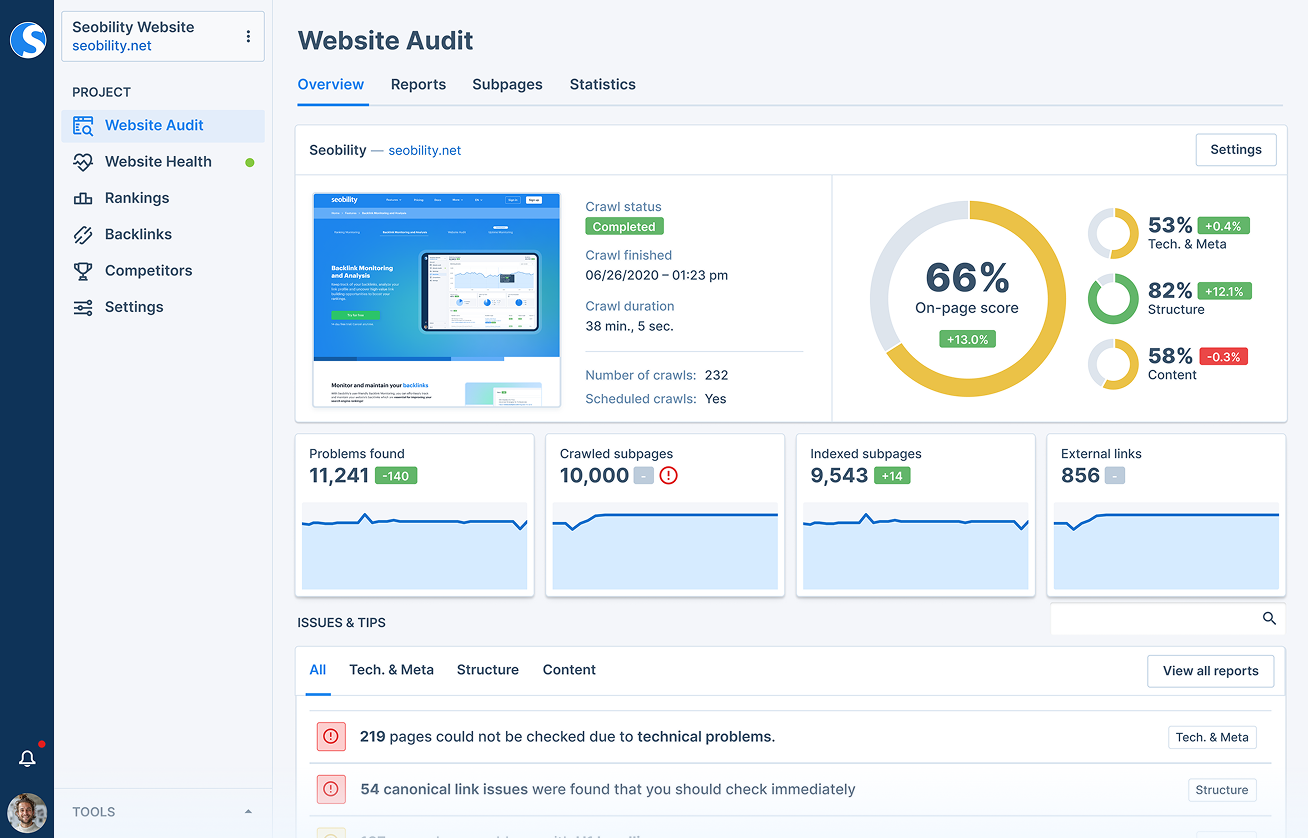
Free Website SEO Score: What It Means and How to Improve Yours
A free website SEO score can give you a quick overview of how well a page is prepared for search engines. It may highlight issues with page titles, mobile usability, loading speed, links and other factors that can affect the experience of visitors and how search engines understand your site.
However, an SEO score is a guide, not a definitive measure of your website’s quality or its likely position in search results. Different tools use different checks and scoring systems, so it is best to treat the result as a starting point for improvement.
What is a website SEO score?
An SEO score is a rating produced by an online checker or audit tool. The tool examines a web page against a set of technical and content-related checks, then presents its findings as a score, a list of errors or recommendations.
A free website SEO score checker may review areas such as:
- Page titles and meta descriptions: whether pages have clear, relevant titles and descriptions.
- Headings: whether content is organised with useful headings.
- Mobile usability: whether the page is practical to use on phones and tablets.
- Page speed: how quickly important page content loads.
- Links: whether internal links work and whether external links are relevant.
- Images: whether images are appropriately sized and have descriptive alternative text where needed.
- Security and indexing: whether the site uses HTTPS and whether search engines can access the page.
- Content: whether the page is useful, clear and relevant to its intended audience.
Why a free SEO score can be useful
For a small business, website owner or beginner, a free checker can make SEO issues easier to spot. It can help you identify missing page titles, broken links, oversized images or other problems that may otherwise go unnoticed.
It is also a useful way to establish a baseline. After making changes, you can run another check and see whether the tool reports improvements. Keep in mind that search rankings may take time to respond, and a higher score does not guarantee more traffic.
How to check your website’s SEO score
- Choose a reputable checker. Look for a tool that explains what it checks, rather than displaying a score without context.
- Enter the page URL. Some tools check one page at a time, while others can review a whole website.
- Review the findings. Read the specific recommendations behind the score and note any issues affecting important pages.
- Prioritise changes. Fix critical technical problems first, then work through improvements to content and usability.
- Check again. Re-run the audit after updates and monitor your website over time.
How to improve your SEO score
Write clear page titles and descriptions
Give each important page a distinct title that accurately describes its content. A well-written meta description can also help people understand what a page offers when it appears in search results. Avoid repeating the same wording across every page or forcing in keywords where they do not read naturally.
Create useful, well-organised content
Focus on answering the questions your intended audience is likely to have. Use a clear heading structure, short paragraphs and descriptive subheadings to make the page easier to scan. Original, helpful information is more valuable than content written simply to include a particular search phrase.
Make your website work well on mobile
Check that text is readable without zooming, buttons are easy to tap and important information is not hidden on smaller screens. A mobile-friendly layout makes the site more convenient for visitors using phones and tablets.
Improve loading speed
Large image files, unnecessary scripts and poorly configured hosting can slow a website down. Compress images where appropriate, remove unused features and consider whether your site’s technical setup needs attention. Test key pages on both desktop and mobile connections.
Check links and images
Fix broken links and use descriptive link text so visitors can tell where a link leads. Add meaningful alternative text to images that convey information. Decorative images generally do not need detailed descriptions.
Make sure search engines can access your pages
Check that important pages are not accidentally blocked from being crawled or excluded from search results. A sitemap and correctly configured robots.txt file can help with site management, but they do not replace useful content or a clear website structure.
Why scores differ between SEO tools
There is no single universal SEO scoring system. One checker may place greater emphasis on technical settings, while another may focus on content, performance or mobile usability. As a result, the same website can receive different scores from different tools.
Some checks are also more important than others. A missing security setting or a page that cannot be indexed deserves prompt attention. A minor recommendation about wording may be less urgent. Read the explanation for each result and use your judgement rather than trying to achieve a perfect score at any cost.
Common mistakes to avoid
- Changing a page solely to satisfy a scoring tool, even when the change makes it less useful to visitors.
- Adding keywords unnaturally or repeating them too often.
- Assuming a high score guarantees strong search rankings.
- Ignoring technical problems because the overall score looks good.
- Running multiple audits without following up on the issues they identify.
Frequently asked questions
Is a free website SEO score accurate?
A free audit can identify many common issues, but it cannot assess every aspect of SEO. Results depend on the tool’s checks, and some recommendations may not suit every website. Use the audit as a practical guide, not a complete diagnosis.
What is a good SEO score?
There is no universal score that every website should reach. Scoring systems vary, so concentrate on fixing meaningful problems and making the site more helpful, accessible and reliable for visitors.
Can improving my SEO score improve my Google rankings?
Fixing issues such as inaccessible pages, slow loading or unclear content may support a better website experience and help search engines understand your pages. However, rankings depend on many factors, and no audit score can promise a particular result.
How often should I check my SEO score?
Check your site after significant updates, redesigns or technical changes, and review important pages periodically. Regular monitoring is useful, but frequent checks are only valuable if you act on relevant findings.
Use your SEO score as a starting point
A free website SEO score can help you find practical ways to improve your site, but the number itself is not the goal. Focus on clear information, useful content, sound technical foundations and a smooth experience for visitors. Those improvements are more meaningful than chasing a perfect score from any single tool.
Free Website SEO Scores: 22 Frequently Asked Questions About Checks, Rankings and Audits
- How do I SEO my website for free?
- What is the best SEO score for website?
- How can I Analyse a website for free?
- How can I check my SEO score for free?
- How can I check my website ranking for free?
- How can I check my website SEO?
- How can I check my website SEO ranking?
- Can you SEO for free?
- How can I get a free SEO report?
- How can I get SEO score?
- How can I check my website SEO for free?
- How do I create a SEO score for my website?
- How can I check my website SEO score for free?
- How do I check my site for SEO errors?
- What is my SEO score?
- How do I find my SEO score?
- Can SEO be done for free?
- Do SEO site audits free?
- How do I check my website SEO ranking?
- How can I check my SEO performance?
- Is 80 SEO score good?
- How can I check my SEO score online for free?
How do I SEO my website for free?
You can improve your website’s SEO for free by creating useful, original content that answers your audience’s questions, and using clear page titles, headings and descriptions. Make sure your site works well on mobile, loads quickly, has working links and can be accessed by search engines. Free tools such as Google Search Console can help you find indexing issues and understand how people discover your pages. Prioritise the fixes that will help visitors most, and remember that SEO takes time—no free tool or score can guarantee higher rankings.
What is the best SEO score for website?
There is no single “best” SEO score for a website, as free SEO checkers use different tests and scoring systems. Rather than aiming for a perfect rating, focus on fixing important issues, such as pages that cannot be indexed, slow loading times or unclear content, and making your site useful and easy to navigate. Use the score as a guide to improvement, not as a guarantee of search rankings.
How can I Analyse a website for free?
You can analyse a website for free by using online SEO audit tools, website speed testers and mobile-friendly checks. Enter your website’s URL to review issues such as page titles, broken links, loading times, mobile usability and whether search engines can access your pages. Free tools may limit the number of pages or checks available, and their scores can vary, so treat their recommendations as a useful starting point rather than a complete assessment. Prioritise fixes that improve the experience for visitors and make your content easier for search engines to understand.
How can I check my SEO score for free?
You can check your SEO score for free by entering your website’s URL into a free online SEO checker. The tool will scan your site for common issues, such as missing page titles, broken links, slow loading times and mobile usability problems, then provide a score and suggestions for improvement. As different tools assess websites in different ways, use the score as a helpful starting point rather than a definitive measure of your search performance.
How can I check my website ranking for free?
You can check your website ranking for free using Google Search Console. After verifying your site, open the Performance report to see which search queries bring up your pages, along with their impressions, clicks and average position. You can also search for relevant terms in a private browsing window, but results may vary by location, device and search history, so this is less reliable. Remember that rankings can change over time, and a single position does not show the full picture of your website’s organic performance.
How can I check my website SEO?
You can check your website’s SEO by using a free online SEO checker to scan a page or your whole site for common issues, such as missing page titles, broken links, slow loading times and mobile usability problems. Review the recommendations carefully and prioritise changes that improve access to your pages and make them more useful for visitors. As SEO tools use different scoring systems, treat the results as a helpful starting point rather than a definitive measure of your search performance.
How can I check my website SEO ranking?
You can check your website’s SEO ranking by searching for the relevant keywords in Google, ideally using a private browsing window, though results may still vary by location and search history. For a more reliable view, use Google Search Console to see which searches bring people to your site and where your pages appear on average. SEO tools can also track rankings over time, but treat their figures as estimates, as positions can change between searches, devices and locations.
Can you SEO for free?
Yes, you can improve your website’s SEO for free by creating useful, well-structured content, writing clear page titles and descriptions, fixing broken links, making pages mobile-friendly and using free tools to check for technical issues. These steps take time and won’t guarantee higher search rankings, but they can help search engines understand your site and make it more useful for visitors.
How can I get a free SEO report?
You can get a free SEO report by entering your website address into a reputable online SEO checker. The tool will usually review factors such as page titles, mobile-friendliness, loading speed, links and technical settings, then provide a score with recommendations. Some services assess one page at a time, while others offer a limited website-wide audit. Use the report as a guide: review the issues it identifies, prioritise the most important fixes and remember that different tools may produce different scores.
How can I get SEO score?
You can get an SEO score by entering your website’s URL into a free online SEO checker. The tool will scan the page for common issues, such as missing titles, broken links, slow loading times and mobile usability problems, then provide a score and recommendations. As scoring methods vary, use the result as a guide and focus on fixing the issues that matter most to your visitors and website.
How can I check my website SEO for free?
You can check your website’s SEO for free using an online SEO audit tool. Enter your website address to get a report on areas such as page titles, mobile usability, loading speed, links and indexing. Free tools may only check a limited number of pages, and each uses its own scoring system, so treat the results as a guide. Start by fixing the most important issues the report identifies, then check your site again after making changes.
How do I create a SEO score for my website?
To create an SEO score for your website, use a free SEO audit tool and enter your website’s URL. The tool will check factors such as page titles, mobile usability, loading speed, links and whether search engines can access your pages, then provide a score with recommendations. As scoring systems vary, treat the result as a guide: prioritise the issues that matter most to visitors and your site, make improvements, then run the audit again to track progress.
How can I check my website SEO score for free?
You can check your website’s SEO score for free using an online SEO audit tool. Enter your website’s URL and the tool will scan for common issues, such as missing page titles, broken links, slow loading times and mobile usability problems. As different tools use different checks, treat the score as a helpful starting point rather than a definitive measure of your search performance.
How do I check my site for SEO errors?
To check your site for SEO errors, use a reputable website audit tool to scan your pages for issues such as missing page titles, broken links, slow loading times, mobile usability problems and indexing restrictions. Review the recommendations carefully, prioritise the problems that could prevent visitors or search engines from accessing important content, then make changes and run the audit again. Remember that each tool checks different things, so use its score as a guide rather than a definitive measure of your site’s SEO.
What is my SEO score?
Your SEO score is an estimate of how well your website or a specific page meets a range of search engine optimisation checks. A free SEO checker may assess factors such as page titles, content, mobile usability, loading speed, links and technical settings. Scores vary between tools, so use yours as a guide to identify areas for improvement rather than as a definitive measure of your search rankings or website quality.
How do I find my SEO score?
To find your SEO score, enter your website or page URL into a free online SEO checker and run an audit. The tool will review factors such as page titles, mobile usability, loading speed and links, then show a score with recommendations. Scores vary between tools, so use the results as a guide to identify issues rather than as a definitive measure of your website’s search performance.
Can SEO be done for free?
Yes, SEO can be done for free. You can improve your website by creating helpful content, using clear page titles and headings, making pages mobile-friendly, fixing broken links and using free tools to check performance and indexing. These steps take time and effort, and some advanced tools or specialist support may cost money, but you can make meaningful SEO improvements without a paid subscription.
Do SEO site audits free?
Yes, many SEO tools offer free site audits that check for common issues such as broken links, missing page titles, mobile usability and loading speed. Free audits may be limited to a certain number of pages or provide fewer details than paid services, so check what each tool includes. Use the results as a helpful starting point, as no audit can guarantee higher search rankings.
How do I check my website SEO ranking?
To check your website’s SEO ranking, search for the key phrases you want your pages to appear for and note where they show in the results. For a more accurate picture, use a rank-tracking tool or Google Search Console, which can show the queries bringing visitors to your site, along with impressions, clicks and average positions. Rankings can vary by location, device and search history, so check several relevant terms over time rather than relying on one search or a single SEO score.
How can I check my SEO performance?
You can check your SEO performance by using free tools such as Google Search Console to review search impressions, clicks, rankings and indexing issues, alongside a website SEO checker to spot technical problems like slow loading, broken links or missing page titles. Track key measures over time, compare results with previous periods and focus on changes that matter to your visitors. An SEO score is a useful guide, but it does not guarantee higher rankings, so consider it alongside organic traffic, conversions and the quality of your content.
Is 80 SEO score good?
An SEO score of 80 is generally a good result, but what it means depends on the tool’s scoring system and the checks it performs. Use it as a helpful indicator rather than a guarantee of strong search rankings: review any important issues the audit identifies, prioritise improvements that benefit visitors, and remember that SEO performance depends on many factors beyond a single score.
How can I check my SEO score online for free?
You can check your SEO score online for free by entering your website’s URL into a reputable SEO audit tool. Many free checkers scan a page for common issues, such as missing page titles, broken links, slow loading times, mobile usability and basic technical settings. Review the recommendations behind the score, as each tool uses different checks and a high score does not guarantee better search rankings.
Tags: alternative text, broken links, free website seo score, https, image optimization, indexing, internal links, meta descriptions, mobile usability, organic traffic, page speed, page titles, robots.txt, search engine accessibility, search engine optimization, seo audit, seo content, seo improvements, seo rankings, seo score, seo tools, sitemap, technical seo, website audit, website performance, website seo score checker, website usability