
Online Site Analyser: A Practical Guide to Understanding Your Website
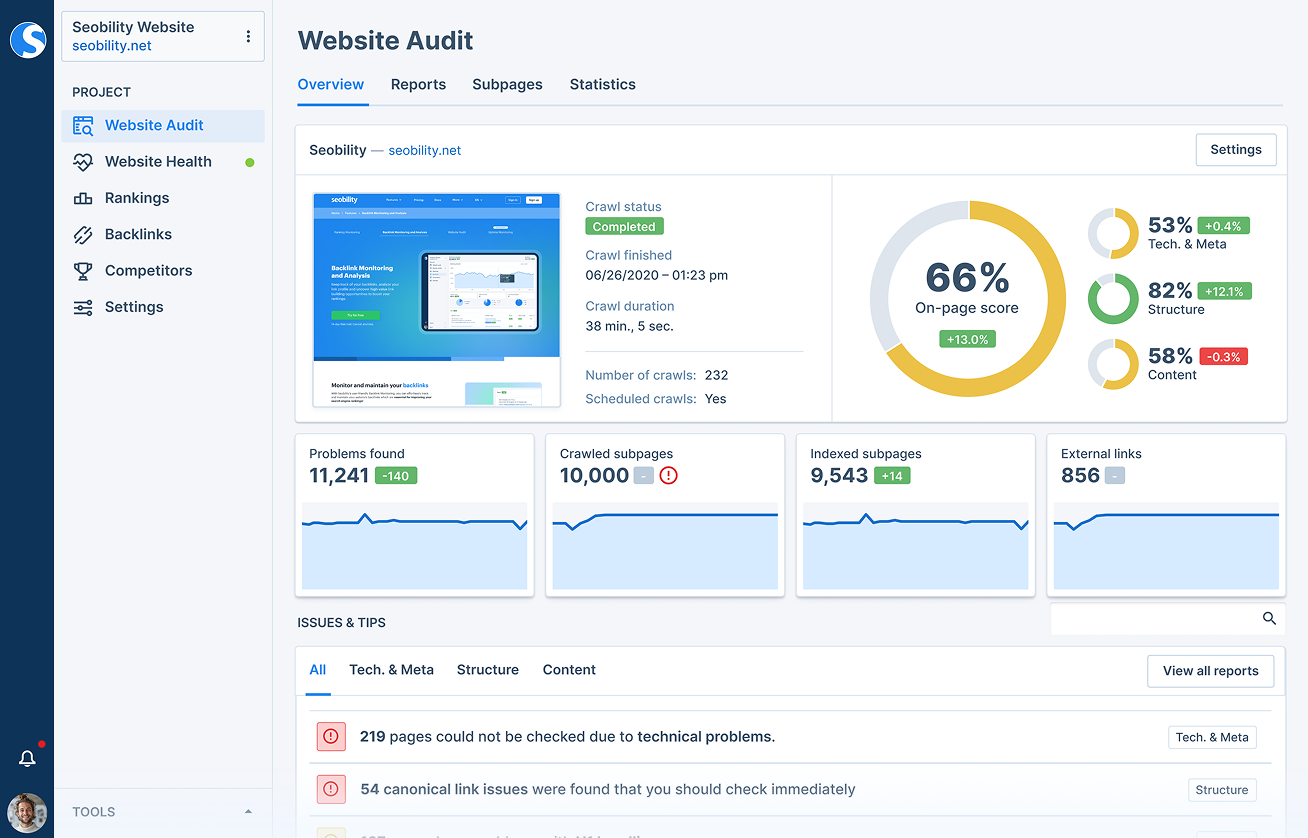
An online site analyser is a tool that checks a website and reports on areas that may affect its performance, visibility and usability. Depending on the tool, it can assess search engine optimisation (SEO), page speed, mobile-friendliness, accessibility, security and technical setup.
Whether you manage a business website, a blog or an online shop, an analyser can help you spot issues and decide what to improve. It is a useful starting point for understanding how a website is working, although its results should be treated as guidance rather than a complete assessment.
What does an online site analyser check?
Different tools examine different aspects of a website. Common checks include:
- SEO: Page titles, meta descriptions, headings, image text alternatives, links and indexability.
- Performance: Loading times, image sizes, scripts and other factors that can affect how quickly pages appear.
- Mobile usability: Whether pages display and work well on smaller screens.
- Accessibility: Potential barriers for people using assistive technology, including missing labels or insufficient colour contrast.
- Security: Basic checks such as whether the site uses HTTPS and has a valid security certificate.
- Technical health: Broken links, redirects, crawl errors and other problems that may affect visitors or search engines.
Why use one?
A site analyser can make website maintenance more manageable. Instead of checking every page manually, you can use a report to identify possible problems and prioritise the most important fixes. This may help improve the experience for visitors, support search visibility and reduce the risk of technical issues going unnoticed.
Regular checks can also be useful after a redesign, a content update or a change to your hosting or website platform. Comparing reports over time gives you a clearer picture of whether your changes are having the intended effect.
How to use an online site analyser
- Choose the pages to check. Start with your homepage and important pages, such as product, service or contact pages.
- Run the analysis. Enter the page address into the tool and allow it to complete its checks.
- Review the findings. Look for specific explanations, not just an overall score.
- Prioritise issues. Begin with problems that affect visitors, security or access to key content.
- Make changes and test again. Re-run the analysis to confirm whether the issue has been resolved.
How to interpret the results
Reports often use scores, warnings or colour-coded labels. These can be helpful, but they do not always tell the whole story. A low-priority recommendation may have little effect on your particular site, while a seemingly small issue could prevent visitors from completing an important task.
Use the findings as a checklist. Check the context, consider how the issue affects real users and, where possible, confirm it with another tool or a manual review. For example, a speed report can highlight large images, but testing the page on a mobile device can show how the experience feels in practice.
Limitations to keep in mind
An online analyser can only assess what it is designed and able to access. Some tools examine a single page rather than an entire website, and automated checks may miss issues that require human judgement. Results can also vary between tools because they use different methods and criteria.
SEO tools cannot guarantee higher rankings, and a good score does not necessarily mean a website is easy to use or effective. Treat automated reports as one part of a broader approach that includes user feedback, analytics and regular content reviews.
Choosing the right tool
Before using an analyser, consider what you need to learn. A site owner focused on loading times may want a performance-testing tool, while someone reviewing search visibility may need a more detailed SEO audit. Look for clear explanations, practical recommendations and checks that match your goals.
It is also worth reviewing the tool’s privacy information before submitting a website address, particularly if the site is private or still in development. Free tools can be useful for quick checks, while larger websites may benefit from paid services that offer scheduled audits and wider coverage.
Make website checks part of your routine
An online site analyser can help you find opportunities to improve your website, but the most valuable results come from taking action. Check key pages regularly, fix issues according to their impact and test your changes with real users where possible. Used thoughtfully, an analyser is a practical aid to keeping a website fast, accessible and easy to use.
Top 7 Tips for Effective Online Site Analysis
- Check page speed on desktop and mobile.
- Review SEO titles and meta descriptions.
- Test links for errors and redirects.
- Check accessibility and colour contrast.
- Scan for security issues and outdated software.
- Compare results across several pages.
- Fix the highest-impact problems first.
Check page speed on desktop and mobile.
Check your page speed on both desktop and mobile, as visitors may have very different experiences depending on their device and connection. An online site analyser can highlight slow-loading pages and identify issues such as oversized images or unnecessary scripts. Pay particular attention to mobile results, where slower connections and smaller screens can make delays more noticeable, then retest after making improvements.
Review SEO titles and meta descriptions.
Review your SEO titles and meta descriptions to make sure they accurately describe each page and include the terms your audience is likely to search for. Titles should be clear and concise, while meta descriptions should give people a useful reason to visit. An online site analyser can flag missing, duplicated or overly long descriptions, helping you prioritise updates and present your pages more effectively in search results.
Test links for errors and redirects.
Test your website’s links regularly to catch broken pages, outdated destinations and unnecessary redirect chains. Broken links can frustrate visitors, while multiple redirects may slow down page loading or make it harder for search engines to crawl your site. An online site analyser can help identify these issues; update links to point directly to the correct page, or set up a suitable redirect when a page has moved.
Check accessibility and colour contrast.
Check accessibility and colour contrast to help make your website usable for everyone, including people with visual impairments. An online site analyser can flag issues such as text that is difficult to distinguish from its background, missing image descriptions or form fields without clear labels. Treat these results as a helpful starting point: review key pages manually, check that text remains readable on different devices, and make sure interactive elements can be used with a keyboard.
Scan for security issues and outdated software.
Use an online site analyser to check for security issues and outdated software, such as old content management systems, plugins or libraries. These can leave your website vulnerable to attacks, so review any warnings carefully, install updates from trusted sources and remove software you no longer use. Back up your site before making significant changes, and arrange regular scans to help catch new risks early.
Compare results across several pages.
Compare results across several pages to build a more accurate picture of your website’s overall health. A homepage may perform well while product, service or contact pages have slower loading times, missing information or technical issues. Analyse a representative mix of important pages, then look for recurring problems and prioritise fixes that affect the most visitors.
Fix the highest-impact problems first.
When using an online site analyser, fix the highest-impact problems first. Prioritise issues that affect security, prevent key pages from loading, make the site difficult to use on mobile or block visitors from completing important tasks. These are likely to matter more than minor warnings or small score improvements. Once the critical problems are resolved, work through the remaining recommendations and run the analysis again to check your progress.
Tags: accessibility, broken links, content review, crawl errors, https, loading times, mobile usability, online site analyser, online site analyzer, page speed, performance, performance testing, redirects, search engine optimisation, search visibility, security certificate, seo, seo audit, technical health, user experience, website analysis, website analytics, website audit, website maintenance, website optimisation, website security