
How to Check Your Website’s SEO Score
Checking your website’s SEO score is a useful way to spot issues that may affect its visibility in search results. An SEO score can highlight areas such as page speed, mobile usability, on-page content and technical setup. It is best treated as a guide, rather than a definitive measure of how well your website will rank.
What Is an SEO Score?
An SEO score is an assessment produced by an SEO tool after it checks selected parts of your website. Different tools use different criteria, so the results can vary. One might focus on technical SEO, while another may give more weight to content, links or user experience.
A score can help you understand where to investigate, but it does not guarantee higher rankings. Search engines consider many factors, including the usefulness and relevance of your content, the quality of links to your site and the experience visitors have when they use it.
How to Check Your Website’s SEO Score
- Choose a suitable SEO tool. Options include Google Search Console for search performance and technical reports, and website audit tools that assess factors such as page speed, metadata and broken links.
- Enter your website address. Some tools will review your homepage, while others let you crawl several pages across your site.
- Review the findings. Look beyond the overall score and check the individual recommendations. These are often more useful than the number itself.
- Prioritise important issues. Start with problems that prevent search engines from accessing key pages, harm the mobile experience or make pages slow and difficult to use.
- Make changes and check again. After updating your site, run another audit to see whether the issues have been resolved.
What Should an SEO Website Check Include?
Technical SEO
Check that important pages can be crawled and indexed. Review your robots.txt file, XML sitemap, redirects and any crawl errors reported in Google Search Console. Make sure each page has a clear, relevant URL and that broken links are fixed.
Page speed and mobile usability
Your pages should load efficiently and work well on mobile devices. Large images, unnecessary scripts and slow hosting can affect performance. Test key pages on different screen sizes and look for layout problems, hard-to-use buttons or text that is difficult to read.
On-page SEO
Review page titles, meta descriptions, headings and image descriptions. Each page should have a clear purpose and include wording that accurately reflects its subject. Avoid repeating keywords unnaturally or using the same title across many pages.
Content quality
Useful content should answer visitors’ questions clearly and accurately. Check that your pages are up to date, easy to navigate and written for people rather than search engines. Add detail where it helps readers, and remove wording that is repetitive or does not serve a purpose.
Links
Internal links help visitors and search engines find related pages on your website. Check that important pages are linked from relevant sections and that links use descriptive text. You can also review links from other websites, but focus on earning relevant, trustworthy links rather than pursuing large numbers of low-quality ones.
How to Improve Your SEO Score
- Fix critical indexing and crawling errors first.
- Improve slow pages and optimise large image files.
- Make your site easy to use on mobile devices.
- Write unique page titles and useful meta descriptions.
- Organise content with clear headings and helpful internal links.
- Update pages that contain outdated or incomplete information.
- Use Google Search Console to monitor impressions, clicks and indexing issues.
Don’t Focus on the Number Alone
An SEO audit score is only a snapshot based on the checks carried out by a particular tool. A lower score does not necessarily mean your website cannot perform well in search, and a high score does not guarantee strong rankings. Some recommendations may not suit your website, so consider their value before making changes.
For the clearest picture, combine audit results with real-world measures such as organic traffic, search impressions, enquiries, sales and user engagement. Review these regularly to understand whether your improvements are helping visitors and supporting your business goals.
Final Thoughts
Checking your website’s SEO score can reveal practical ways to improve its technical health, content and usability. Use the score as a starting point, tackle the most important issues first and track your progress over time. A helpful, accessible website is a stronger foundation for sustainable search visibility than a score alone.
Top 5 Essential Tips for Evaluating Your Website’s SEO Performance
- Use a trusted SEO checker to scan your website.
- Check page titles and meta descriptions for every page.
- Test your site’s speed on mobile and desktop.
- Review broken links and crawl errors regularly.
- Track organic traffic and rankings over time.
Use a trusted SEO checker to scan your website.
Use a trusted SEO checker to scan your website and identify issues that could affect its visibility in search results. Choose a reputable tool that provides clear, actionable recommendations, then review its findings on page speed, mobile usability, metadata, broken links and indexing. Treat the score as a helpful guide rather than a guarantee of rankings, and prioritise fixes that will make your site easier for both visitors and search engines to use.
Check page titles and meta descriptions for every page.
Check the page title and meta description on every page of your website. Each should be unique, accurate and clearly describe what visitors will find, using relevant search terms naturally. A clear title can help search engines understand the page, while a useful meta description may encourage people to click through from search results. Avoid duplicated wording, keyword stuffing and descriptions that promise more than the page delivers.
Test your site’s speed on mobile and desktop.
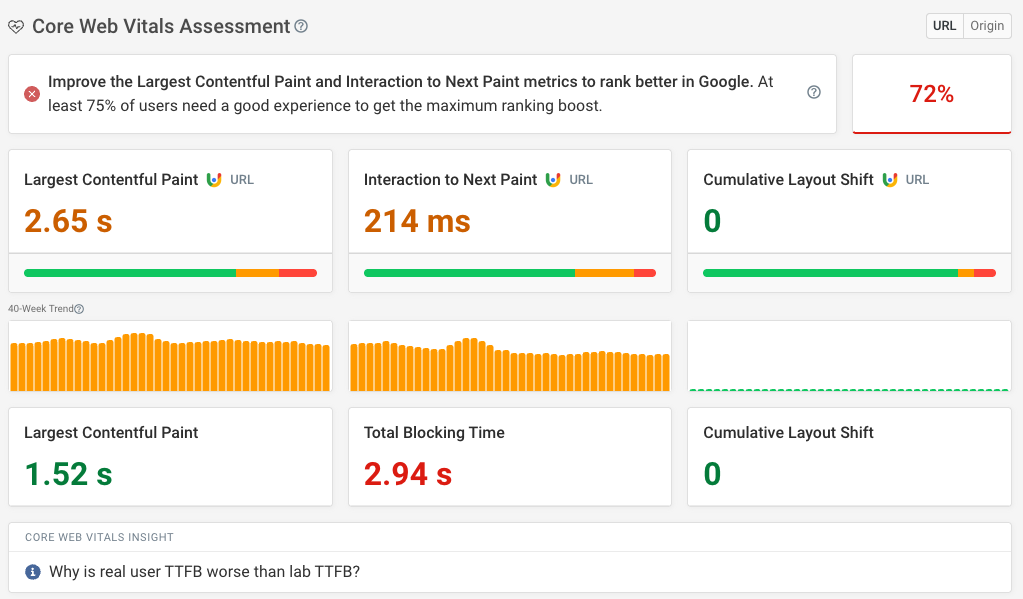
Test your site’s speed on both mobile and desktop, as visitors may have very different experiences depending on their device and internet connection. Use a performance tool to identify slow-loading pages, then address common issues such as oversized images, unnecessary scripts and inefficient code. Faster pages are easier to use and can support a better overall experience for visitors.
Review broken links and crawl errors regularly.
Review broken links and crawl errors regularly to help visitors and search engines navigate your website. Broken links can lead to frustrating dead ends, while crawl errors may prevent important pages from being discovered or indexed. Use tools such as Google Search Console to identify issues, then update or remove broken links and fix problems such as incorrect redirects or unavailable pages. Rechecking your site after changes can help keep it accessible and in good working order.
Track organic traffic and rankings over time.
Track organic traffic and keyword rankings over time to see whether your SEO improvements are making a difference. Use tools such as Google Search Console to monitor clicks, impressions and average positions, and compare results across weeks or months rather than relying on a single snapshot. Remember to consider seasonal changes and updates to your website, as these can affect performance.
Tags: broken links, check seo website score, content quality, google search console, indexing, internal links, metadata, mobile usability, on-page seo, organic traffic, page speed, robots.txt, search rankings, search visibility, seo audit, seo recommendations, seo tools, technical seo, website crawling, website seo score, xml sitemap