
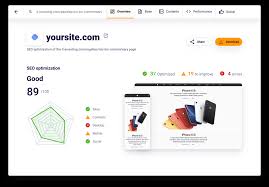
Check Your SEO Score: A Practical Guide to Improving Your Website
Want more people to find your website through search engines? Checking your SEO score can help you spot issues that may be holding your pages back. It is a useful starting point for improving your site, but it is important to remember that no single score can predict exactly where a page will appear in search results.
What is an SEO score?
An SEO score is an estimate produced by an online tool to show how well a webpage follows selected search engine optimisation (SEO) recommendations. Depending on the tool, it may assess factors such as page titles, headings, mobile usability, page speed, links and metadata.
Different tools use different checks and scoring systems. Treat your result as a guide to areas worth reviewing, rather than a definitive measure of your website’s quality or ranking potential.
How to check your SEO score
- Choose a reputable SEO checker. Look for a tool that explains what it checks and gives practical recommendations, rather than simply presenting a number.
- Enter the page URL. Start with an important page, such as your homepage or a key service page. You can check other pages individually afterwards.
- Review the results. Note any technical errors, missing information or opportunities to improve the page.
- Prioritise the recommendations. Fix significant issues first, then work through improvements that are relevant to your audience and goals.
- Check again after making changes. Re-running the audit can help you confirm that specific issues have been resolved.
What should an SEO checker look for?
Page titles and descriptions
Each page should have a clear, unique title that accurately describes its content. A useful meta description can also help searchers understand what the page offers. Search engines may choose to display different text in results, so neither element guarantees a particular listing.
Useful, well-structured content
Pages should answer the questions visitors are likely to have. Use a clear heading structure, keep paragraphs focused and explain specialist terms where needed. Include relevant search terms naturally, but avoid repeating keywords in a way that makes the writing awkward.
Mobile usability
Check that your website works well on phones and tablets. Text should be easy to read, links should be simple to tap and important information should not be difficult to find on a smaller screen.
Page speed and technical health
Slow-loading pages can frustrate visitors. Large image files, unnecessary scripts and poor hosting can all affect performance. An SEO audit may also flag technical issues such as broken links, redirect problems or pages that cannot be crawled.
Internal and external links
Internal links help visitors move between related pages and help search engines discover your content. Links to external sources can provide useful context when they genuinely support what you are saying. Make sure links work and use descriptive link text.
Images and accessibility
Use relevant image file names and write concise alternative text when an image conveys information. Alternative text helps people using assistive technology understand the image; it should not be used as a place to stuff keywords.
Why your SEO score is not the whole story
A high score does not guarantee more traffic or a higher search position. Search visibility depends on many factors, including the usefulness and originality of your content, your site’s technical performance, competition for relevant searches and the needs of the person searching.
Some audit tools also report recommendations that may not apply to every website. Review each suggestion before making changes, especially if it involves removing content, changing URLs or installing a plugin. Poorly considered changes can create new problems.
Make SEO improvements that matter
Use your SEO score as a way to identify possible improvements, then focus on changes that make the site more helpful and easier to use. Start with pages that matter most to your organisation, fix clear technical problems, and update content where it no longer answers visitors’ questions.
After making changes, monitor relevant measures such as organic visits, search impressions, click-through rates and enquiries. Reviewing these over time gives you a more useful picture of progress than relying on a single score.
Final thoughts
Checking your SEO score is a straightforward way to begin reviewing your website. Use a trusted checker, understand what its recommendations mean and tackle the most valuable improvements first. The best long-term SEO work combines sound technical foundations with clear, useful content for real people.
6 Essential Tips for Evaluating Your SEO Score Effectively
- Use a trusted SEO checker to review your score.
- Check each important page, not just your homepage.
- Review mobile speed and usability.
- Fix broken links and missing meta descriptions.
- Track your score over time.
- Treat the score as a guide, not a guarantee.
Use a trusted SEO checker to review your score.
Use a trusted SEO checker to review your score and identify areas where your website could improve. Choose a tool that explains its findings and offers practical recommendations, then focus on the issues most likely to help visitors and support your website’s goals. Remember, an SEO score is a useful guide—not a guarantee of higher search rankings.
Check each important page, not just your homepage.
Check each important page on your website, not just your homepage. Service, product and information pages may attract visitors through different searches, so review each one for relevant titles, useful content, clear headings, working links and mobile usability. This helps you find page-specific issues and improve the parts of your site that matter most to your visitors.
Review mobile speed and usability.
Review your website’s speed and usability on mobile devices, as many visitors will access it from a phone or tablet. Check that pages load quickly, text is easy to read without zooming, menus are simple to use and buttons and links are easy to tap. A smooth mobile experience can help visitors find what they need and may support your wider SEO efforts.
Fix broken links and missing meta descriptions.
Fixing broken links and adding missing meta descriptions are simple ways to improve your website’s SEO and user experience. Broken links can frustrate visitors and make it harder for search engines to explore your pages, so check them regularly and update or remove any that no longer work. Write a clear, relevant meta description for each important page to summarise its content and help people decide whether to visit it from search results.
Track your score over time.
Track your SEO score over time to see whether your website improvements are making a difference. Check it regularly using the same tool, and note any changes alongside updates to your content or site. Scores can vary between tools and may fluctuate, so treat them as a guide rather than a definitive measure of success. Look at them alongside practical results, such as organic traffic, search impressions and enquiries.
Treat the score as a guide, not a guarantee.
Treat your SEO score as a helpful guide, not a guarantee of higher search rankings or more website traffic. Scores vary between tools and are based on selected checks, so use the results to identify areas worth improving rather than as a final verdict on your website. Focus on changes that make your pages more useful, accessible and easy to navigate for visitors.
Tags: broken links, check your seo score, click-through rates, external links, image accessibility, internal links, meta descriptions, mobile usability, organic traffic, page speed, page titles, search engine optimisation, search impressions, search visibility, seo audit, seo checker, seo recommendations, seo score, structured content, technical seo, useful content, website performance, website seo