
How to Check Your Website’s Search Ranking
Knowing where your website appears in search results can help you understand how people find your business online. Checking your site ranking shows which pages are visible for particular search terms, whether your visibility is improving and where there may be opportunities to attract more visitors.
Search rankings are not fixed. They can change as search engines update their results, competitors publish new content and people search from different locations or devices. For a useful picture of your performance, it is best to look at trends rather than rely on a single search.
What does a website ranking mean?
A website ranking is the position a page holds in search results for a particular query. For example, a page might appear near the top when someone searches for a specific service, but much lower for a broader phrase.
Rankings apply to individual pages and search terms, not simply to a whole website. A site can perform well for one keyword and have little visibility for another. That is why it helps to check the terms that are genuinely relevant to your organisation, products or services.
Ways to check your site ranking
Use Google Search Console
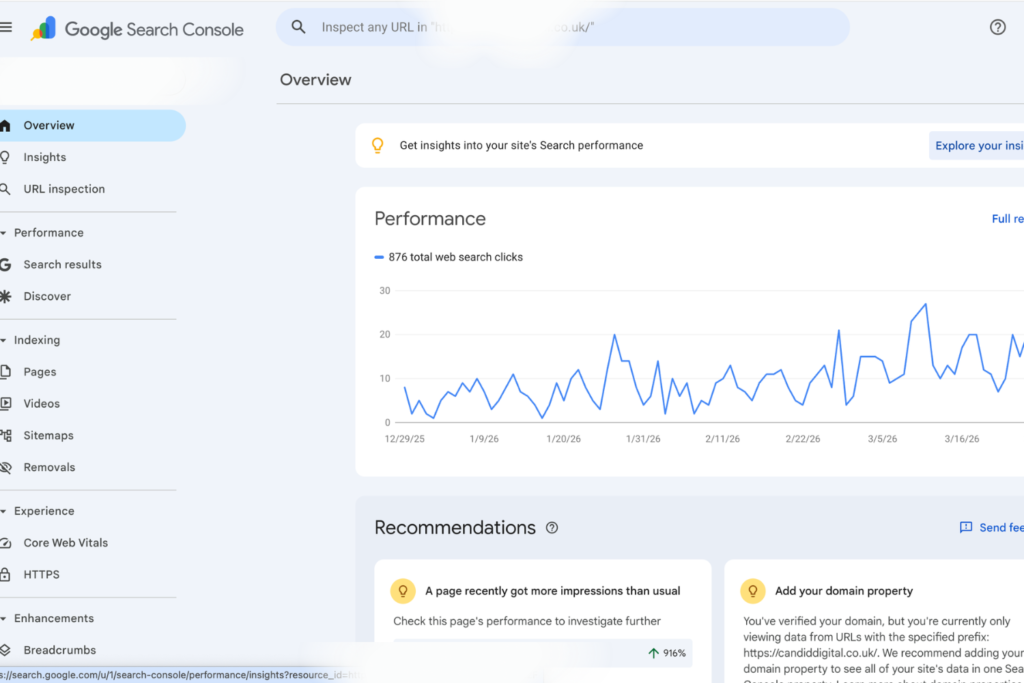
Google Search Console is a free tool that provides information about how a website performs in Google Search. Its performance report can show:
- the queries that led people to your pages;
- how often your pages appeared in search results;
- how many people clicked through to your site; and
- your average position for different queries and pages.
Average position is not a guaranteed ranking for every search. It is an average across the recorded impressions, which may come from different locations, devices and search contexts. Use it to identify patterns and changes over time.
Use a rank-tracking tool
SEO platforms and rank-tracking tools can monitor selected keywords on a regular basis. Depending on the service, they may let you compare performance by location, device or search engine, and see how your position changes over time. Check what is included before choosing a tool, as features and costs vary.
Search manually with care
Typing a keyword into a search engine can give you a quick impression of the results, but it is not a reliable way to measure ranking. Results can be influenced by your location, language, search history, device and other factors. A manual check is best treated as a snapshot, not a definitive report.
How to check rankings effectively
- Choose relevant search terms. Include the phrases your audience is likely to use, including local terms where appropriate.
- Check the right page. Search engines rank pages, so identify which page should answer each query.
- Set a consistent location and device. This makes comparisons more meaningful, particularly for local businesses.
- Record results over time. Weekly or monthly checks can reveal trends without overreacting to short-term fluctuations.
- Review clicks as well as positions. A ranking is useful, but traffic and meaningful actions on your site matter too.
What to do if your rankings are low
Start by checking whether the relevant page is indexed and accessible to search engines. Then review whether it clearly answers the searcher’s question. Helpful, original content, descriptive page titles, clear headings, a good mobile experience and fast loading times can all contribute to a stronger website experience.
It is also worth checking that each important page has a clear purpose and is not competing with another page on your site for the same topic. For local searches, ensure your business details are accurate and consistent across your website and relevant online listings.
A sudden change in position does not always mean something is wrong. Search results fluctuate, and ranking improvements can take time. Look at several indicators, including impressions, clicks and relevant enquiries, before deciding what to change.
Make ranking checks part of your SEO routine
Checking your site ranking is most useful when it informs practical decisions. Use reliable data, monitor a focused set of relevant search terms and review performance regularly. Over time, this can help you understand what your audience is searching for and where your website has the best opportunity to become more visible.
7 Tips for Checking Your Website’s Google Rankings
- Check your key pages in Google Search Console.
- Track rankings for your target keywords regularly.
- Check results on mobile and desktop.
- Compare rankings in your target locations.
- Watch ranking trends, not daily fluctuations.
- Review competitors’ positions for important keywords.
- Check whether ranking changes affect site traffic.
Check your key pages in Google Search Console.
Check your key pages in Google Search Console to see which search queries are bringing people to your site and how often those pages appear in Google results. The Performance report also shows clicks, impressions and average position, helping you spot pages that are gaining visibility or may need improvement. Review the data over time, as rankings can vary by location, device and search query.
Track rankings for your target keywords regularly.
Track your rankings for target keywords regularly to see how your website performs in search results over time. A consistent check can help you spot upward or downward trends, understand which pages are gaining visibility and identify areas that may need improvement. Use the same keywords, location and device settings where possible, and focus on longer-term patterns rather than reacting to small day-to-day changes.
Check results on mobile and desktop.
Check your site rankings on both mobile and desktop, as search results can differ depending on the device. Comparing them helps you spot where your pages perform well and whether mobile users are seeing a different set of results. Use the same search terms and location when checking, so you can make a more meaningful comparison.
Compare rankings in your target locations.
Compare your rankings in the locations you want to reach, as search results can vary from one town, region or country to another. Use a rank-tracking tool that lets you set a specific location, or review location data in Google Search Console to see where your pages are gaining visibility. This helps you understand whether your site is reaching the right audience and where local content or SEO improvements may be needed.
Watch ranking trends, not daily fluctuations.
Watch ranking trends rather than daily fluctuations. Search positions can change from day to day due to updates, location and personalisation, so a single check may not give an accurate picture. Track your rankings consistently over several weeks or months to spot meaningful patterns and make informed decisions about your SEO.
Review competitors’ positions for important keywords.
Reviewing competitors’ positions for your important keywords can reveal where your site stands and highlight opportunities to improve. Compare the pages that appear alongside yours in search results, noting the topics they cover, how clearly they answer the searcher’s needs and whether they target local or specialist terms. Use these findings to identify gaps in your own content, rather than simply copying competitors. Rankings can vary by location and change over time, so check them consistently using the same tools and settings.
Check whether ranking changes affect site traffic.
When checking your site ranking, look at whether position changes are affecting website traffic. Compare ranking data with clicks, visits and impressions over the same period, and check which pages and search terms have gained or lost visitors. A ranking drop may not reduce traffic if the page still appears prominently, while a small improvement could bring more relevant visitors. Reviewing these figures together helps you understand whether a change matters and where to focus your efforts next.
Tags: average position, check my site ranking, google search console, keyword rankings, local seo, organic traffic, page indexing, rank-tracking tools, ranking trends, search performance, search results, search terms, seo, website optimization, website ranking, website search ranking, website visibility