
Website Page Speed Checker: Why It Matters and How to Use One
A website page speed checker helps you understand how quickly your pages load and where there may be room for improvement. Whether you run a small business website, an online shop or a blog, a faster site can make it easier for visitors to find what they need and complete the actions you want them to take.
Page speed is not just about convenience. Slow-loading pages can frustrate visitors, encourage them to leave and make your website feel less reliable. Regular checks can help you spot performance issues before they affect more of your audience.
What does a page speed checker do?
A page speed checker analyses a web page and reports on aspects of its loading performance. Depending on the tool, it may test the page on desktop and mobile, simulate different network conditions and highlight technical factors that could be slowing it down.
Most checkers provide a performance score alongside a list of suggested improvements. The score is useful as a quick reference, but it should not be treated as the only measure of success. A good checker also explains what is affecting the page and which changes could make the biggest difference.
Why website speed matters
- Better visitor experience: People can view content and use your website with less waiting.
- Fewer abandoned visits: Visitors may be more likely to stay when pages respond promptly.
- Improved mobile usability: Fast loading is particularly important for people browsing on mobile devices or slower connections.
- Support for search visibility: Search engines consider page experience and performance among a range of factors when assessing websites.
- More effective conversions: A responsive website can make it easier for visitors to make a purchase, submit an enquiry or sign up.
What do the results mean?
Page speed reports often include several measurements. The names and scoring methods vary between tools, but you may see metrics such as:
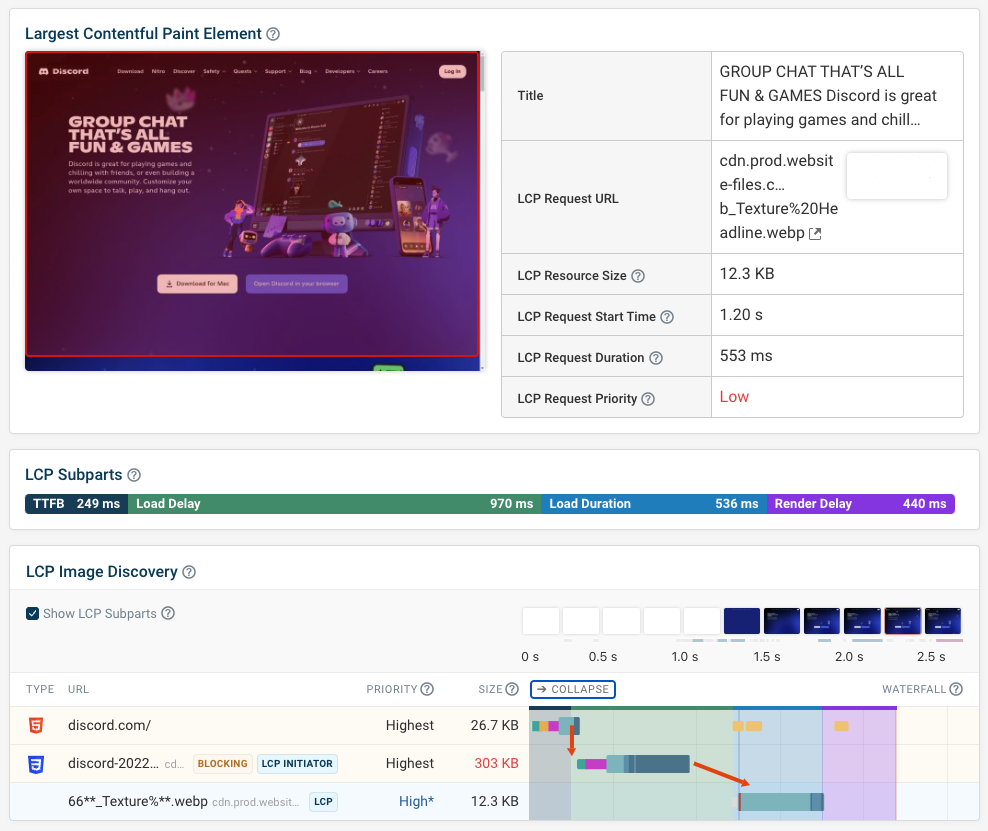
- Largest Contentful Paint (LCP): How long it takes for the main content in the visible part of a page to appear.
- Interaction to Next Paint (INP): How quickly a page responds visually after a visitor interacts with it.
- Cumulative Layout Shift (CLS): How much visible content moves around while the page loads.
- Time to First Byte (TTFB): How long the browser waits for the server to begin sending a response.
These metrics look at different parts of the experience. For example, a page might appear quickly but still feel unresponsive when someone taps a button. Reviewing several measurements gives you a more useful picture than relying on one score.
How to use a website page speed checker
- Choose an important page. Start with your homepage, a popular product or service page, or a page where visitors often complete a key action.
- Run the test more than once. Results can vary due to network conditions, server load and other factors. Repeat tests to look for consistent patterns.
- Check both mobile and desktop. A page can perform differently depending on the device and screen size.
- Review the recommendations. Look for specific issues, such as oversized images, render-blocking scripts or a slow server response.
- Prioritise the biggest opportunities. Address changes that are likely to improve the experience without disrupting important features.
- Test again after making changes. Compare the new results with the original report and check that the page still works as expected.
Common causes of slow pages
A checker may identify issues such as large image files, too many third-party scripts, unnecessary code or slow hosting. Other possible causes include inefficient caching, unoptimised fonts, redirects and pages that load content they do not immediately need.
Images are often a good place to start. Using appropriately sized files and modern formats can reduce the amount of data a browser needs to download. However, speed improvements usually require looking at the whole page, including its design, hosting and any tools or services it relies on.
Tips for improving page speed
- Resize and compress images before uploading them.
- Remove plugins, scripts and features that are no longer needed.
- Use browser caching and content delivery services where appropriate.
- Reduce unnecessary redirects and requests to external services.
- Review your hosting arrangements if server response times are consistently slow.
- Load non-essential content only when it is needed.
- Retest key pages after website updates, redesigns or changes to your hosting.
Use scores as a guide, not a goal
A high performance score can be encouraging, but it does not automatically mean every visitor will have a fast experience. Testing tools use particular devices, locations and network conditions, which may differ from those of your audience. A score can also change from one test to another.
Use the report to identify practical improvements, then check your website on real devices and across important user journeys. The aim is not simply to achieve a perfect number: it is to make your pages quicker, more responsive and easier to use.
Make speed checks part of regular website care
A website page speed checker is most useful when it is part of an ongoing routine. Test key pages periodically, especially after adding new features, changing themes or publishing large amounts of content. By monitoring performance and acting on clear recommendations, you can help keep your website welcoming and reliable for visitors.
Essential FAQs on Using Website Page Speed Checkers
- What is a website page speed checker?
- How do I check my website’s page speed?
- Are website page speed checkers free to use?
- What is a good page speed score?
- Why is my website loading slowly?
- How can I improve my website’s page speed?
- How often should I check my website’s page speed?
What is a website page speed checker?
A website page speed checker is an online tool that tests how quickly a web page loads and responds to visitors. It can highlight issues affecting performance, such as large images, slow server responses or unnecessary scripts, and suggest ways to improve the experience on desktop and mobile devices.
How do I check my website’s page speed?
To check your website’s page speed, enter the URL of a page into an online speed-testing tool and run the analysis. Test key pages on both mobile and desktop, and repeat the test if results vary. Review the report for loading and responsiveness metrics, as well as practical recommendations such as compressing images or reducing unnecessary scripts. Focus on changes that will make the site easier to use, then test again to see whether performance has improved.
Are website page speed checkers free to use?
Yes, many website page speed checkers are free to use, including tools that provide performance scores and practical recommendations. Some services also offer paid plans with extra features, such as more frequent monitoring, detailed reports or testing across multiple pages. Check the tool’s terms and limits, as free tests may restrict the number of checks or the level of detail available.
What is a good page speed score?
A good page speed score depends on the testing tool, but in Google PageSpeed Insights, a score of 90–100 is considered good, 50–89 needs improvement, and below 50 is poor. Treat the score as a guide rather than a guarantee: results can vary between tests and devices, so also review the recommendations and how quickly your site works for real visitors on mobile and desktop.
Why is my website loading slowly?
Your website may be loading slowly because of large, unoptimised images, too many scripts or plugins, slow web hosting, or inefficient page code. External tools, such as advertising, analytics and embedded videos, can also add loading time. Use a website page speed checker to identify likely bottlenecks, then address the most significant issues and test the page again.
How can I improve my website’s page speed?
You can improve your website’s page speed by reducing the size of images, removing unnecessary scripts and plugins, and enabling caching so returning visitors do not have to reload every element. Check that your hosting is reliable, limit redirects and load non-essential content only when it is needed. Use a page speed checker to identify the changes likely to have the greatest impact, then test your key pages on both mobile and desktop after making updates.
How often should I check my website’s page speed?
Check your website’s page speed at least once a month, and after major changes such as a redesign, new features, plugin updates or a change of hosting. It’s also worth testing key pages if visitors report that the site feels slow or you notice a drop in enquiries or sales. Regular checks help you spot problems early and keep your website performing well on both mobile and desktop.
Tags: browser caching, content delivery services, conversion optimization, cumulative layout shift cls, desktop testing, image optimization, interaction to next paint inp, largest contentful paint lcp, mobile usability, page loading performance, page speed, page speed test, performance score, render-blocking scripts, search visibility, server response time, slow-loading pages, time to first byte ttfb, user experience, website hosting, website optimization, website page speed checker, website performance, website performance monitoring, website speed