
Rank Site Check: How to Monitor Your Website’s Search Performance
A rank site check helps you see where your webpages appear in search results for particular keywords. Regularly checking rankings can show whether your search engine optimisation (SEO) work is making a difference, highlight pages that need attention and reveal opportunities to attract more visitors.
What is a website rank check?
A website rank check measures a page’s position in search results for a chosen search term. For example, a local business might check where its website appears when someone searches for a service in a particular town.
Rankings can vary depending on the search engine, location, device and the person’s search history. A single result is therefore only a snapshot. Tracking performance over time gives a more useful picture.
Why check your website rankings?
- Measure progress: See whether changes to your content or website are improving visibility.
- Spot declines: Identify keywords or pages that have lost ground and may need investigating.
- Find opportunities: Discover relevant search terms for which your pages are already appearing.
- Understand the competition: Compare your visibility with other websites targeting similar searches.
- Support better decisions: Use ranking data alongside visits, enquiries and other measures of performance.
How to carry out a rank site check
- Choose relevant keywords. Focus on the phrases your audience is likely to use, including specific questions and location-based searches where appropriate.
- Check the right pages. Note which page you expect to appear for each keyword. This can help reveal when the wrong page is showing in search results.
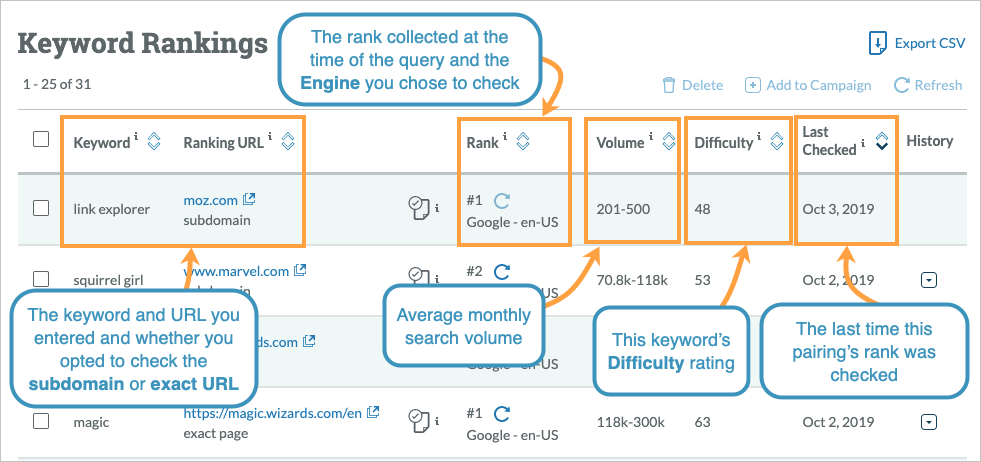
- Select a tracking method. Search performance platforms and dedicated rank-tracking tools can report positions over time. Check what each tool measures and how often its data is updated.
- Set the location and device. Results may differ between regions and between mobile and desktop searches, so match the settings to your intended audience.
- Record a baseline. Save the initial results, then review them at regular intervals rather than reacting to daily fluctuations.
- Compare rankings with other data. Look at impressions, clicks, website visits and conversions to understand whether visibility is bringing useful results.
Rankings are only one part of SEO
A high position can increase the chance of being seen, but it does not guarantee clicks or business. The wording of your page title and description, the relevance of your content and the appearance of the search results can all affect whether someone visits your site.
Likewise, a ranking change does not automatically mean that a website has a technical problem. Search results are dynamic, and positions can move as competitors update their pages, search engines change their systems or demand for a topic shifts.
Common rank-checking mistakes
- Checking only one keyword: A small set of terms may not represent the range of searches that matter to your website.
- Expecting identical results for everyone: Location, device and personalisation can influence what people see.
- Making changes after every movement: Short-term fluctuations are normal. Look for sustained trends before drawing conclusions.
- Ignoring the search results page: Maps, images, featured answers and other features can affect how much attention standard listings receive.
- Focusing on position alone: Rankings should be considered alongside traffic quality and meaningful outcomes, such as enquiries or sales.
A simple website ranking checklist
- Track search terms that are relevant to your audience and goals.
- Check performance by location and device where it matters.
- Review trends consistently, using the same settings where possible.
- Make sure each important search term has a useful, relevant page.
- Investigate significant changes before making major updates.
- Measure clicks and outcomes as well as search positions.
Make rank checks part of a wider review
A regular rank site check can be a practical part of managing a website, provided the results are treated as guidance rather than a complete measure of success. Combine ranking data with useful content, a technically sound website and measures that reflect your real goals. This gives you a clearer understanding of what is working and where further improvement may be worthwhile.
Essential FAQs on Website Rank Checking Tools and Techniques
- Is there a free tool to check my website ranking?
- What is a rank checker used for?
- How do I check the ranking of a website?
- How to use Google rank Checker?
Is there a free tool to check my website ranking?
Yes, there are free tools to check your website’s search performance. Google Search Console shows the queries your site appears for, along with impressions, clicks and average position. Some SEO tools also offer limited free rank checks. Keep in mind that rankings can vary by location, device and search history, so use the results as a guide and look for trends over time rather than relying on a single check.
What is a rank checker used for?
A rank checker is used to monitor where a website appears in search engine results for selected keywords. It can help you track changes over time, assess the impact of SEO work, compare visibility across locations or devices, and identify pages that may need improvement. Rankings can fluctuate, so it’s best to use a rank checker alongside data such as clicks, website visits and enquiries.
How do I check the ranking of a website?
To check a website’s ranking, choose the keywords you want to track and use a search performance tool or rank-tracking service to see where your pages appear in search results. Set the relevant country or location and device, as rankings can vary, and review the results regularly to spot longer-term trends. For a fuller picture, compare rankings with impressions, clicks and visits, rather than relying on position alone.
How to use Google rank Checker?
To use a Google rank checker, enter the keyword you want to track, your website address and the relevant location and device settings, then run the check to see where your page appears in Google’s results. Repeat the check over time using the same settings to spot trends, as rankings can vary by location, device and search context. Treat the result as a useful snapshot rather than a complete measure of SEO success, and consider it alongside clicks, website visits and conversions.
Tags: clicks and conversions, keyword rankings, local search rankings, organic traffic, rank site check, rank tracking, ranking trends, search engine optimisation, search impressions, search performance, search ranking tools, search results, search visibility, seo, seo checklist, seo performance, website rank check, website rankings, website traffic