
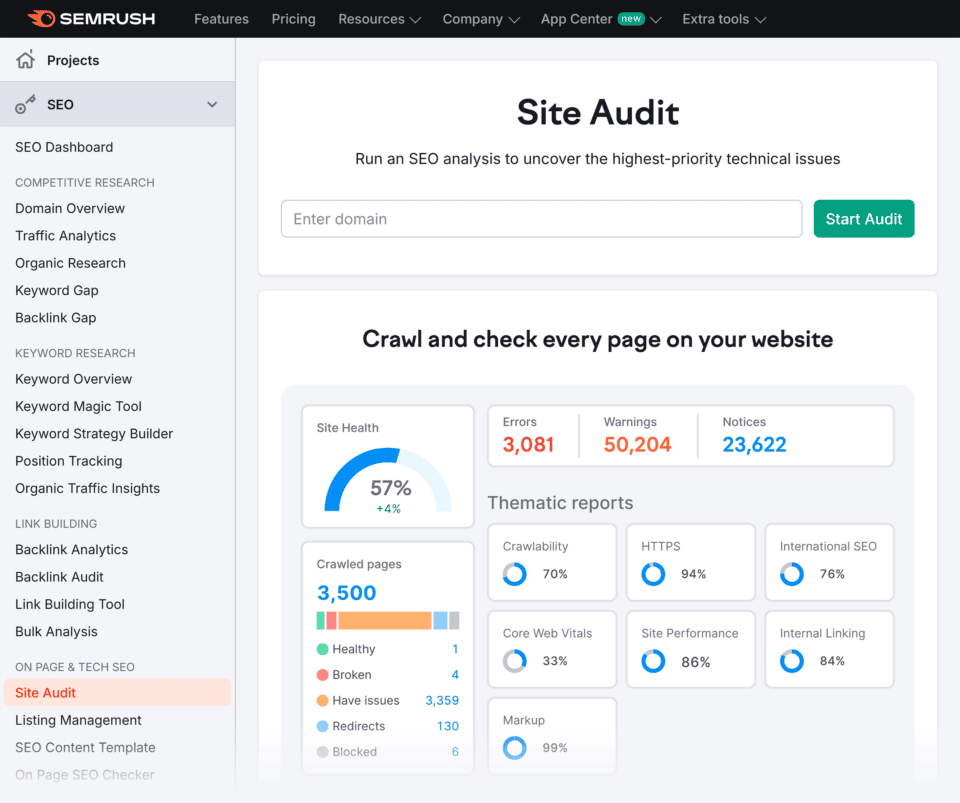
SEO Website Analyzer: A Practical Guide to Improving Your Website
An SEO website analyzer is a tool that checks a website for factors that can affect its visibility in search engines. It can highlight technical problems, assess on-page content and offer suggestions for improving performance. Whether you run a small business website, an online shop or a blog, an analyzer can help you understand what is working and what may need attention.
These tools do not guarantee higher rankings. Search engines use many signals to decide which pages to show, and no single report can tell the whole story. Used alongside careful research and regular improvements, however, an SEO website analyzer can make it easier to spot issues and plan your next steps.
What does an SEO website analyzer check?
The features vary between tools, but many analyzers review several important areas:
- Technical SEO: Checks for issues such as broken links, crawlability problems, redirects and missing XML sitemaps.
- Page titles and meta descriptions: Identifies pages with missing, duplicated or unclear metadata.
- Headings and content: Reviews heading structure, page text and how clearly a page addresses its subject.
- Mobile usability: Looks at whether pages are suitable for visitors using phones and tablets.
- Page speed: Reports on loading performance and may suggest ways to reduce delays.
- Images: Checks for missing alternative text and opportunities to reduce large image files.
- Links: Finds broken internal or external links and may show how pages are connected.
- Security: May flag whether a website uses HTTPS and identify other basic security concerns.
Why use an SEO website analyzer?
A website can contain problems that are difficult to notice during everyday use. A page may look fine to a visitor but still have a missing title, a broken link or a technical setting that prevents search engines from accessing it properly. An analyzer can bring these issues together in one report.
It can also help you prioritise work. Rather than making changes at random, you can start with practical improvements, such as repairing broken pages or making important content easier to understand. Some tools allow you to compare pages or track changes over time, which can be useful when reviewing the impact of updates.
How to use an SEO website analyzer
- Choose the right pages to review. Start with your homepage and key service, product or information pages. You can then check the rest of the site.
- Run a scan. Enter your website address and allow the tool to review the pages it can access.
- Read the findings carefully. Look for specific explanations, not just an overall score. A score is a summary, not a complete measure of SEO quality.
- Prioritise significant issues. Fix problems that affect important pages or prevent visitors and search engines from using the site.
- Make changes and check again. Re-run the analysis after updates to confirm whether the reported issue has been resolved.
How to choose an analyzer
The best SEO website analyzer depends on your needs, budget and level of experience. If you manage a small site, a straightforward tool with clear explanations may be more useful than a complex platform filled with data you are unsure how to interpret. Larger websites may need features such as scheduled crawls, detailed reports and the ability to compare large numbers of pages.
Before choosing a tool, consider:
- Which areas it analyses, such as technical SEO, content or performance
- Whether it explains recommendations in plain language
- How many pages it can check
- Whether you need a free option or are considering a paid subscription
- How it handles your website data and account information
Understand the limitations
An analyzer can identify possible issues, but its recommendations should not be followed blindly. Some findings may be irrelevant to your website, while others may require technical knowledge before changes are made. A tool’s score is also not a direct prediction of search rankings.
Automated checks cannot fully judge whether your content is useful, accurate or genuinely helpful to readers. They may identify words or page elements, but human judgement is needed to make sure the information answers visitors’ questions and reflects your organisation accurately. For complex technical problems, it may be sensible to consult a web developer or SEO specialist.
Make analysis part of ongoing website care
SEO is not a one-off task. Websites change as new pages are published, products are updated and software is maintained. Regular analysis can help you catch problems early and keep important pages accessible, clear and useful.
Use an SEO website analyzer as a starting point: review the evidence, decide which recommendations matter most and make improvements that benefit both search engines and visitors. A well-maintained website is built through consistent, thoughtful work—not by chasing a single score.
8 Tips for Improving Your Site with an SEO Website Analyser
- Crawl your site regularly with an SEO website analyser.
- Fix broken links and missing pages promptly.
- Write unique, descriptive title tags for each page.
- Check meta descriptions for clarity and relevance.
- Review mobile usability and page speed.
- Use headings to structure content clearly.
- Find duplicate content and update it.
- Prioritise fixes by impact and effort.
Crawl your site regularly with an SEO website analyser.
Crawl your site regularly with an SEO website analyser to catch problems before they affect visitors or search visibility. Routine checks can reveal broken links, missing page titles, duplicate content and pages search engines may struggle to access. Review the findings, prioritise issues that affect important pages, and crawl again after making changes to confirm they are fixed.
Fix broken links and missing pages promptly.
Fix broken links and missing pages promptly to give visitors a smoother experience and help search engines find and understand your content. Use an SEO website analyser to identify links that lead to error pages, then update them, redirect them to a relevant page or remove them if they are no longer needed. Check important pages regularly, particularly after redesigns or changes to your site structure, so outdated links do not undermine your website’s usability.
Write unique, descriptive title tags for each page.
Write a unique, descriptive title tag for every page on your website. It should clearly summarise the page’s content and include relevant search terms naturally, so people can quickly understand what they’ll find in search results. Keep titles concise, avoid repeating the same wording across pages, and make sure each one accurately reflects its page rather than promising more than the content delivers.
Check meta descriptions for clarity and relevance.
Check your meta descriptions to make sure they clearly and accurately summarise each page. A relevant, concise description helps visitors understand what they’ll find before they click through from search results. Avoid vague wording and make sure each important page has a unique description that reflects its content.
Review mobile usability and page speed.
Review mobile usability and page speed to make sure your website works well for visitors on phones and tablets. Check that text is easy to read, buttons are simple to tap and pages display correctly on smaller screens. Use your SEO website analyzer to identify slow-loading pages and follow its recommendations, such as compressing large images or reducing unnecessary scripts. A faster, more usable website can improve the visitor experience and make it easier for search engines to crawl your pages.
Use headings to structure content clearly.
Use headings to organise your content into clear, easy-to-follow sections. A logical structure helps visitors find the information they need and makes each page easier to scan. Use one descriptive main heading, followed by relevant subheadings in a sensible order, and make sure each heading accurately reflects the content beneath it. This can also help search engines understand how your page is organised.
Find duplicate content and update it.
Use an SEO website analyser to find duplicate content, such as pages with identical or very similar text. Duplicate pages can make it harder for search engines to understand which version is most relevant, so review each one and update it with useful, original information. Where pages serve the same purpose, consider combining them and redirecting the old URL to the stronger page.
Prioritise fixes by impact and effort.
Prioritise SEO fixes by weighing their likely impact against the effort required. Start with changes that could benefit important pages or resolve major issues—such as broken links, indexing problems or missing page titles—and are straightforward to complete. Lower-impact tasks that require significant time can wait until the essentials are addressed. An SEO website analyser can help organise findings, but use your knowledge of the site and its visitors to decide what matters most.
Tags: broken links, crawlability, external links, heading structure, https security, image alt text, internal links, meta descriptions, mobile usability, on-page content, page speed, page titles, search engine visibility, seo analysis, seo recommendations, seo website analyzer, technical seo, website maintenance, website performance, xml sitemaps