
The Importance of Page Speeds for Website Performance
Page speed, or the time it takes for a web page to load, is a crucial factor that significantly impacts user experience and website performance. In today’s fast-paced digital world, where attention spans are short and competition is fierce, having a fast-loading website is essential for success.
Research has shown that users tend to abandon websites that take too long to load. In fact, a one-second delay in page load time can result in a significant drop in conversion rates. This means that if your website is slow to load, you could be losing potential customers and revenue.
Page speed also plays a key role in search engine rankings. Search engines like Google consider page speed as a ranking factor, with faster-loading websites being favoured in search results. By improving your website’s page speed, you not only enhance user experience but also boost your chances of ranking higher in search engine results pages.
There are several factors that can affect page speeds, including server performance, file sizes, code structure, and image optimization. To improve your website’s page speed, consider implementing techniques such as browser caching, minifying CSS and JavaScript files, compressing images, and reducing server response times.
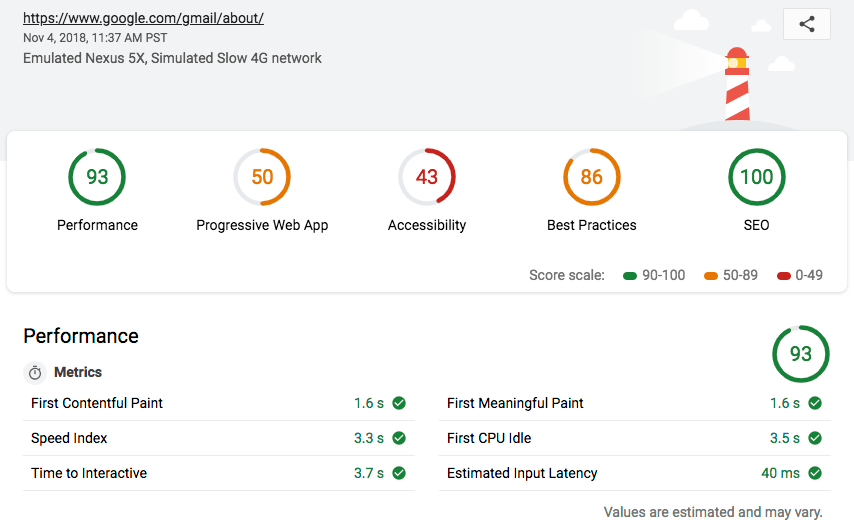
Regularly monitoring and optimising your website’s page speeds is key to maintaining a high-performing website. By prioritising page speed optimisation, you can provide users with a seamless browsing experience, increase engagement and conversions, and enhance your website’s overall performance.
8 Essential Tips to Enhance Your Website’s Page Speed
- Optimize images by compressing them without losing quality.
- Minify CSS, JavaScript, and HTML files to reduce their size.
- Enable browser caching to store data from your site on visitors’ devices for faster loading times.
- Reduce server response time by using a reliable hosting provider and optimizing server settings.
- Implement lazy loading for images and videos to only load them when they come into view.
- Use content delivery networks (CDNs) to distribute your content across multiple servers worldwide.
- Limit the use of redirects as they can slow down page loading speed.
- Regularly monitor and analyze your website’s performance using tools like Google PageSpeed Insights.
Optimize images by compressing them without losing quality.
Optimising images by compressing them without compromising quality is a crucial tip for improving page speeds. By reducing the file size of images through compression techniques, such as using tools like JPEG Optimizer or PNGGauntlet, websites can load faster without sacrificing visual appeal. This not only enhances user experience by ensuring quicker loading times but also contributes to better search engine rankings and overall website performance. Remember, striking the right balance between image quality and file size is key to achieving optimal page speeds without compromising on visual aesthetics.
Minify CSS, JavaScript, and HTML files to reduce their size.
Minifying CSS, JavaScript, and HTML files is a highly effective tip for improving page speeds. By removing unnecessary spaces, comments, and characters from these files, their overall size is reduced, leading to faster loading times for web pages. This optimisation technique not only helps streamline the code but also enhances the efficiency of data transfer between servers and users’ browsers. Implementing minification of CSS, JavaScript, and HTML files is a simple yet powerful way to boost website performance and provide users with a smoother browsing experience.
Enable browser caching to store data from your site on visitors’ devices for faster loading times.
Enabling browser caching is a valuable tip to improve page speeds on your website. By storing data from your site on visitors’ devices, browser caching helps reduce loading times for returning users. This means that when visitors revisit your site, their browsers can quickly retrieve stored data instead of downloading it again, resulting in faster loading times and a smoother browsing experience. Implementing browser caching is a simple yet effective way to enhance user experience and boost the performance of your website.
Reduce server response time by using a reliable hosting provider and optimizing server settings.
Reducing server response time is crucial for improving page speeds. By choosing a reliable hosting provider and optimising server settings, you can significantly enhance the performance of your website. A reputable hosting provider ensures that your website is hosted on stable and high-speed servers, reducing latency and improving response times. Optimising server settings, such as configuring caching mechanisms and minimising unnecessary processes, further streamlines the delivery of content to users. By investing in a reliable hosting provider and fine-tuning server settings, you can effectively decrease server response time, resulting in faster-loading web pages and a better overall user experience.
Implement lazy loading for images and videos to only load them when they come into view.
Implementing lazy loading for images and videos is a smart strategy to improve page speeds. By loading these media files only when they come into view, you can significantly reduce initial loading times and enhance the overall performance of your website. This technique helps prioritise the loading of content that users are currently interacting with, creating a smoother and more efficient browsing experience. Lazy loading not only speeds up page load times but also conserves bandwidth by avoiding unnecessary loading of media assets that may not be immediately visible to users.
Use content delivery networks (CDNs) to distribute your content across multiple servers worldwide.
Utilising content delivery networks (CDNs) is a highly effective strategy to enhance page speeds. By distributing your website’s content across multiple servers located worldwide, CDNs help reduce latency and improve loading times for users regardless of their geographical location. This approach not only boosts the performance of your website but also ensures a seamless browsing experience for visitors, ultimately leading to increased engagement and higher conversion rates. Embracing CDNs as part of your page speed optimisation efforts can significantly elevate the overall user experience and strengthen the global reach of your online presence.
Limit the use of redirects as they can slow down page loading speed.
Redirects should be used sparingly as they have the potential to slow down page loading speed. Every time a redirect is triggered, an additional HTTP request is made, which can increase the time it takes for a web page to fully load. Limiting the use of redirects helps streamline the user experience, reducing unnecessary delays and ensuring that visitors can access content quickly and efficiently. By minimising redirects, website owners can improve page speeds and enhance overall performance, ultimately leading to a more satisfying browsing experience for users.
Regularly monitor and analyze your website’s performance using tools like Google PageSpeed Insights.
Regularly monitoring and analysing your website’s performance using tools like Google PageSpeed Insights is essential for maintaining optimal page speeds. By utilising such tools, you can gain valuable insights into areas that need improvement, identify bottlenecks affecting loading times, and implement targeted optimisation strategies. Monitoring your website’s performance over time allows you to track progress, make informed decisions, and ensure that your site continues to deliver a fast and seamless user experience.
Tags: browser caching, code structure, compressing images, conversion rates, file sizes, image compression techniques, image optimization, javascript files, jpeg optimizer, minifying css, page speed, page speeds, pnggauntlet, search engine rankings, search engine rankings improvement, server performance, server response times, user experience, visual appeal, website performance