
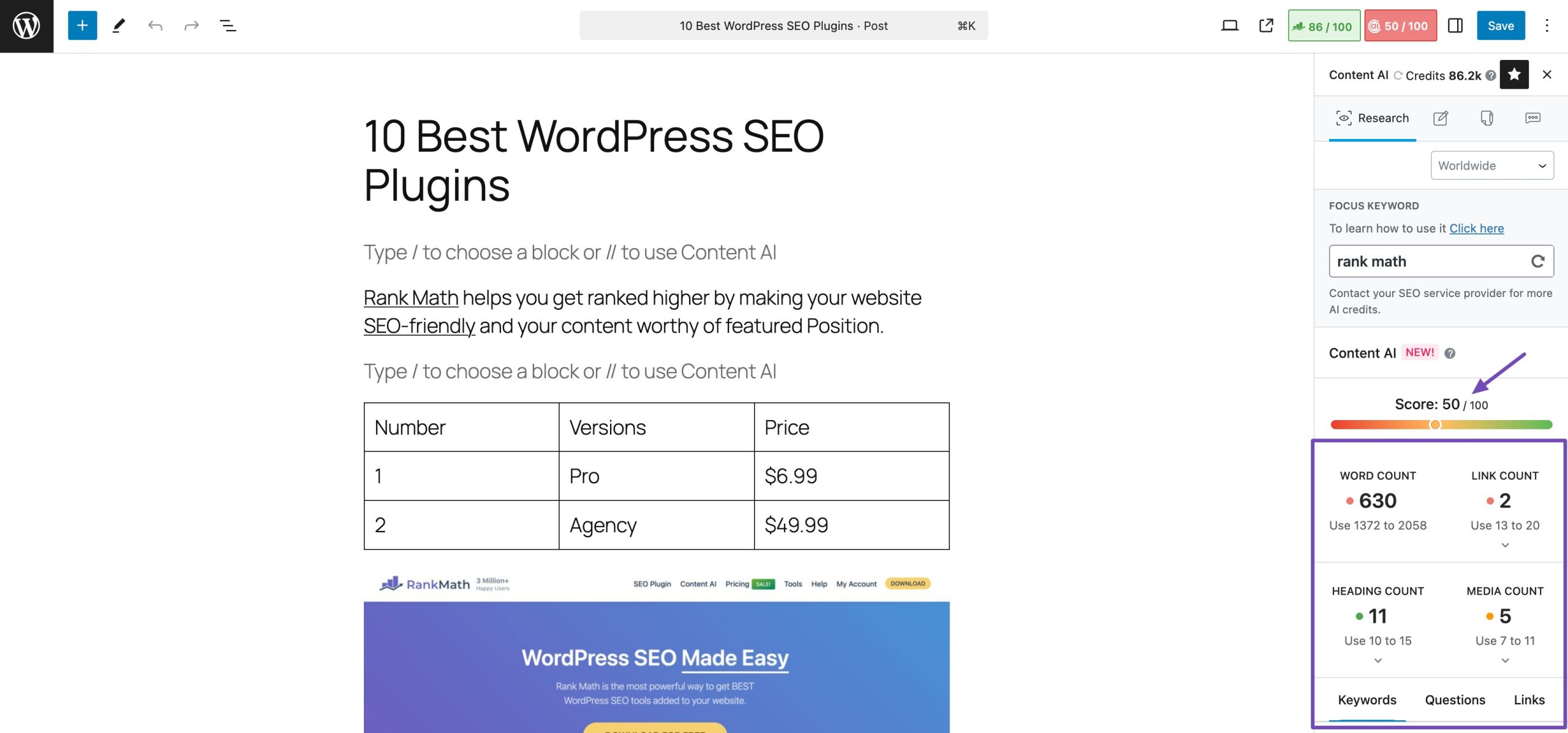
My SEO Score: What It Means and How to Improve It
Your SEO score is a useful snapshot of how well a web page is set up for search engines. It can highlight potential issues with content, page structure, performance and accessibility. However, it is not a guarantee of where your website will appear in search results.
What does an SEO score measure?
Different tools use different methods to calculate an SEO score. They may check factors such as:
- Page titles and meta descriptions: Are they clear, relevant and unique?
- Headings: Is the content organised with helpful headings?
- Content quality: Does the page answer the visitor’s question clearly and thoroughly?
- Images: Do images have descriptive alternative text and sensible file sizes?
- Mobile usability: Is the page easy to use on a phone or tablet?
- Page speed: Does the page load promptly?
- Technical setup: Can search engines access and understand the page?
- Links: Do internal and external links help visitors find useful information?
Why your SEO score is only a guide
An SEO score is best treated as a diagnostic tool, not a measure of success in itself. A high score does not automatically mean more traffic or better rankings. Search engines consider many signals, including relevance, content quality, competition and the needs of the person searching.
Scoring tools may also disagree because they assess pages differently. Instead of trying to achieve a perfect number, use your score to identify genuine problems and prioritise changes that improve the experience for visitors.
How to improve your SEO score
- Start with your audience. Make sure the page provides useful, accurate information and addresses a clear search need.
- Write a descriptive page title. Summarise the page naturally and make each title distinct.
- Organise the content. Use a clear main heading and descriptive subheadings to help readers scan the page.
- Improve page speed. Compress large images, remove unnecessary scripts and check how the page performs on mobile devices.
- Use descriptive links. Link to relevant pages using wording that explains what visitors will find.
- Check technical basics. Confirm that important pages can be indexed, use HTTPS and display correctly on different screen sizes.
- Review the results. Make changes one at a time where possible, then monitor traffic, engagement and search performance.
Focus on progress, not perfection
Your SEO score can help you spot opportunities, but the most valuable improvements are those that make your website clearer, faster and more useful. Review the recommendations carefully, fix important issues first and keep your content up to date. Over time, consistent improvements can support a better experience for both visitors and search engines.
9 Practical Tips to Improve Your SEO Score
- Improve page titles with clear target keywords.
- Write unique meta descriptions for each page.
- Use descriptive headings in a logical order.
- Compress images and add helpful alt text.
- Make pages load quickly on mobile.
- Use clear, descriptive URLs.
- Add relevant internal links between pages.
- Fix broken links and crawl errors.
- Create useful content that matches search intent.
Improve page titles with clear target keywords.
Improve your page titles by including the clear target keywords people are likely to search for. Place the most important phrase naturally in the title, while keeping it concise, accurate and relevant to the page. A well-written title helps search engines understand your content and gives people a clear reason to click—avoid cramming in keywords, as titles should read naturally.
Write unique meta descriptions for each page.
Write a unique meta description for every page on your website. A clear, relevant summary helps people understand what each page offers and can encourage them to choose your result in search listings. Keep descriptions concise, accurate and tailored to the page rather than repeating the same wording across your site. While meta descriptions are not a direct ranking factor, they can help attract the right visitors.
Use descriptive headings in a logical order.
Use descriptive headings in a logical order to make your content easier for visitors and search engines to understand. Start with one clear main heading, then use subheadings to organise related points, moving through the page in a sensible hierarchy. Headings should accurately describe the content that follows, helping readers scan the page and find the information they need.
Compress images and add helpful alt text.
Compressing images can help your pages load faster, particularly on mobile devices, while making them easier for visitors to use. Choose an appropriate file format and reduce image file sizes without noticeably affecting quality. Add concise, descriptive alt text to explain the purpose or content of each meaningful image; for decorative images, use empty alt text so screen readers can skip them. Together, these steps can improve accessibility and support a better overall SEO score.
Make pages load quickly on mobile.
Make sure your pages load quickly on mobile, where slow performance can cause visitors to leave before the content appears. Compress large images, reduce unnecessary scripts and test your pages on different devices and connections. Faster loading improves the user experience and can support your overall SEO performance.
Use clear, descriptive URLs.
Use clear, descriptive URLs that give people and search engines a good idea of what each page is about. Keep them short, use relevant words separated by hyphens, and avoid unnecessary numbers, symbols or strings of random characters. For example, /autograss-racing-events is easier to understand than /page?id=4827. A well-structured URL can make links easier to recognise and share, while helping visitors navigate your website.
Add relevant internal links between pages.
Add relevant internal links between pages to help visitors discover useful information and move around your website with ease. Linking related pages also helps search engines understand how your content is connected and which pages may be most important. Use clear, descriptive link text so people know what to expect, and only link where it adds genuine value.
Fix broken links and crawl errors.
Fixing broken links and crawl errors is a practical way to improve your website’s SEO and make it easier to use. Broken links can frustrate visitors and prevent search engines from discovering important pages, while crawl errors may stop useful content from being indexed. Check your site regularly with an SEO or webmaster tool, update links that point to incorrect URLs, redirect permanently moved pages where appropriate, and restore or remove pages that are no longer available.
Create useful content that matches search intent.
Create useful content that matches search intent by focusing on what people are genuinely looking for when they enter a search query. Answer their questions clearly, provide practical and accurate information, and organise the page so it is easy to read. When your content meets visitors’ needs, it can improve their experience and support your website’s SEO.
Tags: content quality, external links, headings, https, image alt text, improve seo score, internal links, meta descriptions, mobile usability, my seo score, organic traffic, page speed, page titles, search performance, search rankings, seo recommendations, seo score, target keywords, technical seo, user experience, website indexing