
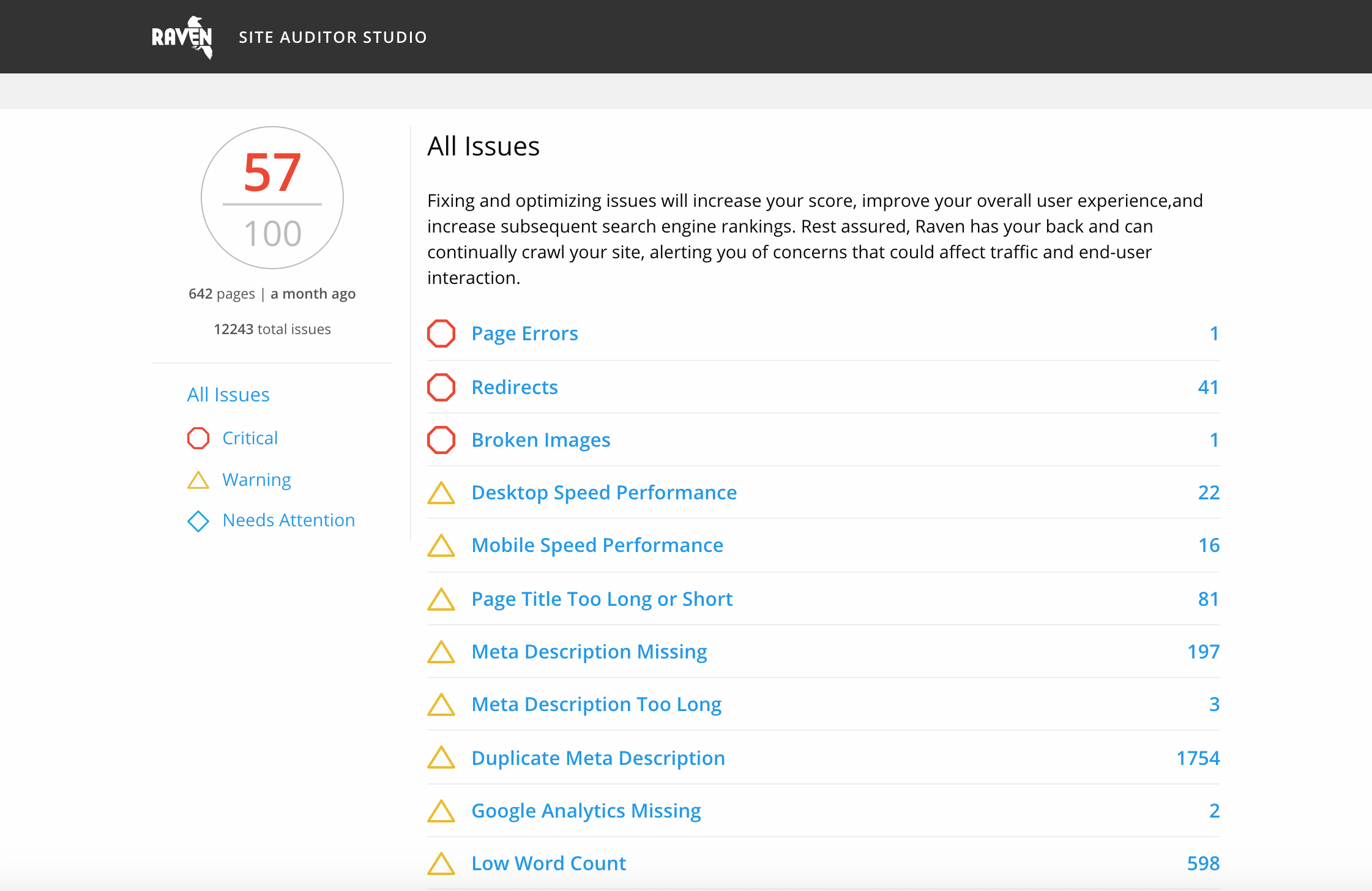
What Is a Site SEO Audit?
A site SEO audit is a detailed review of a website’s ability to appear in search engine results and provide a useful experience for visitors. It helps identify technical problems, content gaps and opportunities to improve visibility in organic search.
An audit is not simply a checklist of errors. It should explain which issues matter most, why they affect performance and what steps can be taken to address them. Whether a website is new or well established, regular reviews can help keep it accessible, useful and easy for search engines to understand.
Why Carry Out an SEO Audit?
Search engines continually update the ways they discover, assess and rank web pages. Meanwhile, websites change as new pages are added, designs are updated and content is revised. These changes can introduce problems that are not always obvious.
A site SEO audit can help you:
- Find pages that search engines cannot crawl or index properly.
- Improve site speed and usability, particularly on mobile devices.
- Identify broken links, redirects and duplicate pages.
- Check that page titles and descriptions accurately represent the content.
- Discover topics or search queries that the website could address more effectively.
- Prioritise improvements based on their likely impact and the work involved.
Key Areas to Review
Technical SEO
Technical SEO covers the way a website is built and accessed. An audit should check whether important pages can be crawled and indexed, whether the XML sitemap is accurate and whether the robots.txt file is configured correctly. It should also look for broken pages, redirect chains, duplicate URLs and incorrect canonical tags.
Security and mobile usability matter too. Confirm that the site uses HTTPS, works on a range of screen sizes and does not create unnecessary barriers for visitors or search engine crawlers.
Content and On-Page SEO
Each important page should have a clear purpose and provide information that meets the needs of its intended audience. Review page titles, headings, introductions and meta descriptions to make sure they are accurate, distinctive and helpful.
Look for thin, outdated or overlapping content. If several pages cover the same subject, they may compete with one another in search results or make it difficult for visitors to find the best answer. Updating, combining or removing content may be more effective than simply publishing more pages.
Site Structure and Internal Links
A logical site structure helps visitors find information and helps search engines understand how pages relate to one another. Important pages should be accessible through clear navigation and supported by relevant internal links.
Check for orphan pages—pages with no internal links pointing to them—as well as broken links and vague link text. Descriptive links make it easier to understand what a visitor will find after clicking.
Performance and User Experience
Slow-loading pages and difficult layouts can frustrate visitors. Review loading performance, image sizes, mobile layouts, readability and the ease of completing key tasks. Technical performance reports can highlight issues, but they should be considered alongside real-world usability.
Authority and External Signals
An audit may also review the website’s external links and reputation. Look for relevant, trustworthy websites that refer visitors to your content, and investigate unusual or suspicious link patterns. Avoid shortcuts or schemes designed to manipulate rankings; a sound approach is to create useful content and build genuine relationships within your field.
How to Conduct a Site SEO Audit
- Set clear goals. Decide what the audit needs to achieve, such as improving visibility for key services, resolving indexing problems or increasing relevant organic traffic.
- Gather baseline information. Review analytics and search performance data to understand how the site is currently performing.
- Crawl the website. Use a suitable crawling tool to identify technical issues, page titles, headings, status codes and internal links.
- Check indexing and search visibility. Review search engine reports and compare indexed pages with the pages you want people to find.
- Assess important content. Examine priority pages for accuracy, usefulness, relevance and overlap with other content.
- Review mobile experience and speed. Test pages on mobile devices and investigate performance problems that could affect visitors.
- Create a prioritised action plan. Record each issue, its impact, the recommended fix, who is responsible and when it should be completed.
- Measure the results. Track changes in indexing, organic traffic, rankings and conversions after improvements are made.
Prioritising Audit Findings
Not every issue needs to be fixed immediately. Start with problems that prevent important pages from being crawled or indexed, then address issues that affect many pages or hinder the experience for visitors. After that, consider content improvements and smaller refinements.
A useful audit separates critical problems from recommendations. It should avoid treating every automated warning as equally important: tools can identify potential issues, but each finding needs to be checked in the context of the website and its goals.
How Often Should You Audit a Website?
The right frequency depends on the size and complexity of the site and how often it changes. A major redesign, migration or change to the URL structure should always be followed by careful checks. For other websites, a regular review—at least once or twice a year—is a sensible way to catch problems before they grow.
Make SEO Audits an Ongoing Process
A site SEO audit provides a clearer view of what is working and what needs attention. The best results come from turning findings into practical improvements, measuring their effect and reviewing the website again as it develops.
By combining technical checks with thoughtful content and a focus on visitors, a website can build a stronger foundation for long-term search visibility.
Top 20 FAQs on Conducting a Comprehensive Onsite SEO Audit
- How do you do onsite SEO audit?
- What is the SEO audit?
- What is SEO site checkup?
- What does a site audit do?
- How much is an SEO site audit?
- How to do SEO audit in 2022?
- How can I audit my website for SEO for free?
- What is an SEO Audit Checklist?
- Are SEO audits worth it?
- How do you conduct SEO site audit?
- What is site audit in SEO?
- How can I test my website SEO?
- How can I SEO audit my website for free?
- What is site audit tool?
- What is included in a site audit?
- How do I audit my SEO site?
- Is an SEO audit worth it?
- How do I do a SEO audit?
- What is SEO audit with example?
- How do I start an SEO audit?
How do you do onsite SEO audit?
To carry out an onsite SEO audit, review the pages on your website to check that they are useful, easy to navigate and clear to search engines. Start with important pages and assess their titles, meta descriptions, headings, content quality and use of relevant search terms. Check that internal links work and help visitors find related information, and look for duplicate, thin or outdated content. Also test mobile usability and page speed, and make sure key pages can be crawled and indexed. Prioritise issues by their impact, make improvements and monitor the results.
What is the SEO audit?
An SEO audit is a review of a website to identify issues that may affect its visibility in search results and its experience for visitors. It typically examines technical factors such as crawling, indexing, page speed and mobile usability, as well as content, page titles, internal links and site structure. The findings help prioritise practical improvements so search engines can understand the site and people can find useful information more easily.
What is SEO site checkup?
An SEO site check-up is a review of a website to identify issues that may affect its visibility in search engines and the experience it provides for visitors. It can assess areas such as page titles and content, mobile usability, loading speed, broken links, site security and whether search engines can crawl and index important pages. The results help prioritise practical improvements, but automated tools should be used as a guide: each finding needs to be checked in the context of the website and its goals.
What does a site audit do?
A site audit reviews your website to identify issues that may affect its visibility in search results, performance and usability. It typically checks technical factors such as crawlability, indexing, loading speed and broken links, as well as content, page structure and mobile experience. The findings help you prioritise practical improvements so search engines can understand your site and visitors can use it more easily.
How much is an SEO site audit?
The cost of an SEO site audit depends on the size and complexity of the website, the depth of the review and whether it includes a prioritised action plan or ongoing support. A small website may need a relatively straightforward audit, while a large or technically complex site usually requires more time and analysis. When comparing quotes, check what is included—such as technical, content and backlink reviews—and whether the recommendations are tailored to your goals.
How to do SEO audit in 2022?
To carry out an SEO audit in 2022, start by defining your goals and reviewing performance data from tools such as Google Search Console and Google Analytics. Check that important pages can be crawled and indexed, then review site speed, mobile usability, HTTPS, broken links, redirects and your XML sitemap. Assess page titles, headings, internal links and content quality, looking for outdated, duplicated or missing information. Prioritise issues by their likely impact on visitors and search visibility, make improvements in order, and monitor the results. SEO tools can help uncover potential problems, but each recommendation should be checked against your website’s needs and audience.
How can I audit my website for SEO for free?
You can audit your website for SEO for free by combining tools such as Google Search Console and Google Analytics with a manual review of your pages. Search Console can highlight indexing, mobile usability and search performance issues, while free website crawlers and page-speed tools can help uncover broken links, missing page titles and slow-loading pages. Check that important pages are accessible, have clear headings and useful, original content, and link sensibly to one another. Free tools may have limits, so prioritise problems that affect key pages and verify automated recommendations before making changes.
What is an SEO Audit Checklist?
An SEO audit checklist is a practical list of tasks used to review a website’s search performance and identify areas for improvement. It typically covers technical SEO, such as crawlability, indexing, site speed and mobile usability; on-page elements, including titles, headings and content; and site structure, internal links and backlinks. Using a checklist helps make an audit thorough and consistent, while allowing issues to be prioritised according to their impact on visitors and search visibility.
Are SEO audits worth it?
Yes, an SEO audit can be worth it if it identifies issues that are limiting your website’s visibility, usability or organic traffic. It can reveal technical problems, content gaps and opportunities to improve, helping you prioritise practical changes rather than relying on guesswork. The value depends on the quality of the audit and whether its recommendations are relevant to your site and acted upon; an audit alone will not improve results.
How do you conduct SEO site audit?
To conduct an SEO site audit, start by setting clear goals and reviewing performance data from tools such as Google Search Console and analytics platforms. Crawl the website to find technical issues, including broken links, indexing problems, duplicate pages and slow-loading content. Then assess page titles, headings, content quality, internal links, mobile usability and site structure. Prioritise fixes according to their impact on search visibility and user experience, implement them, and monitor performance to measure the results.
What is site audit in SEO?
A site audit in SEO is a thorough review of a website to identify issues that may affect its visibility in search engines and the experience it provides for visitors. It typically examines technical factors such as crawling, indexing, page speed and mobile usability, as well as content, site structure and internal links. The findings help prioritise practical improvements so search engines can better understand the site and people can find and use its pages more easily.
How can I test my website SEO?
You can test your website’s SEO by checking how easily search engines can crawl and index its pages, reviewing page titles, headings, content and internal links, and testing mobile usability and loading speed. Free tools such as Google Search Console and PageSpeed Insights can highlight indexing, performance and usability issues, while an SEO crawler can help find broken links, missing metadata and duplicate pages. Use the results to prioritise fixes, then monitor organic traffic and search performance to see whether your changes are helping.
How can I SEO audit my website for free?
You can SEO audit your website for free by using tools such as Google Search Console to check indexing, search performance and technical issues, and PageSpeed Insights to review page speed and mobile performance. Then, manually check key pages for clear titles and headings, useful up-to-date content, working links and easy navigation on mobile. Free website crawlers can also highlight broken links, missing metadata and redirect problems, though their features may be limited. Prioritise issues that affect important pages, fix them where possible, and use Search Console to monitor the results.
What is site audit tool?
A site audit tool is software that scans a website to identify issues that may affect its search visibility, performance or usability. It can highlight problems such as broken links, missing page titles, duplicate content, crawl errors and slow-loading pages. The findings help website owners understand what needs attention, although recommendations should be reviewed in context and prioritised according to their potential impact.
What is included in a site audit?
A site SEO audit typically reviews the technical health, content and usability of a website. It may check whether pages can be crawled and indexed, site speed and mobile performance, broken links and redirects, page titles and headings, duplicate or outdated content, internal linking, and the site’s structure. The audit should highlight issues, explain their likely impact and recommend practical steps to improve search visibility and the experience for visitors.
How do I audit my SEO site?
To audit your SEO, start by reviewing your website’s technical health, including crawlability, indexation, broken links, redirects, mobile usability and page speed. Then assess your content, page titles, headings, internal links and site structure to check that pages are useful, distinct and easy to navigate. Use tools such as Google Search Console and analytics reports to spot indexing issues and understand organic traffic, and consider a site-crawling tool for a broader technical review. Finally, prioritise the most important findings, make improvements and monitor the results over time.
Is an SEO audit worth it?
Yes, an SEO audit is worth it if it identifies issues that are limiting your website’s visibility, usability or ability to attract relevant visitors. It can uncover technical problems, outdated content and opportunities to improve, helping you prioritise changes based on their likely impact. The value depends on turning the findings into action, so an audit should provide clear, practical recommendations rather than just a list of errors.
How do I do a SEO audit?
To carry out an SEO audit, start by setting clear goals and reviewing your website’s search performance. Use a website-crawling tool and Google Search Console to check for issues such as pages that cannot be indexed, broken links, duplicate content, slow loading times and missing or unclear page titles. Review your most important pages to ensure their content is accurate, useful and relevant to what people are searching for, and check that your site is easy to navigate on mobile and desktop. Finally, prioritise the fixes by impact, make an action plan and monitor performance to see whether your changes are working.
What is SEO audit with example?
An SEO audit is a review of a website to find issues that may affect its visibility in search engines and the experience it provides to visitors. For example, an audit of an online shop might reveal that important product pages are missing from Google’s index, several pages have duplicate title tags and large images are slowing down mobile loading times. The audit would explain why these issues matter and recommend practical fixes, such as improving internal links, writing unique titles and compressing images.
How do I start an SEO audit?
Start an SEO audit by defining your goals and identifying the pages that matter most to your business or organisation. Review available data from tools such as Google Search Console and analytics platforms, then crawl your site to check for issues such as broken links, indexing problems, duplicate content and missing page titles. Next, assess mobile usability, page speed and whether your content answers visitors’ needs. Record your findings in a prioritised action plan, tackling critical technical issues first and tracking results as you make improvements.
Tags: broken links, content gaps, duplicate pages, external links, indexing, internal links, meta descriptions, mobile usability, on-page seo, ongoing seo review, organic search, organic traffic, page titles, prioritised action plan, redirects, search analytics, search rankings, search visibility, seo audit process, site seo audit, site speed, site structure, technical seo, user experience, website crawling, website migration, website performance