
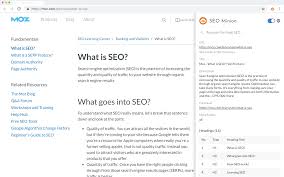
Page SEO Analyzer: How to Improve a Web Page’s Search Performance
A page SEO analyzer is a tool that checks an individual web page for factors that may affect its visibility in search engines. It can highlight issues with page titles, headings, content, links, images, technical settings and other on-page elements, helping website owners decide what to improve.
Whether you manage a business website, publish articles or work in digital marketing, analysing pages regularly can help you spot problems and create a clearer, more useful experience for visitors.
What does a page SEO analyzer check?
The exact features vary between tools, but a page SEO analyzer will often review several areas:
- Page title: Whether the title is present, descriptive and relevant to the page.
- Meta description: Whether a concise summary has been provided for search results. A meta description is not a direct ranking guarantee, but it can help people understand what the page offers.
- Headings: How heading elements are used to organise the content and make it easier to scan.
- Content: Whether the page addresses its subject clearly and provides useful information for its intended audience.
- Images: Whether images have suitable file sizes and descriptive alternative text where appropriate.
- Internal and external links: Whether links help users navigate the site and find relevant information.
- Mobile usability: Whether the page is practical to use on smaller screens.
- Technical signals: Items such as indexability, canonical tags, structured data and page loading performance, depending on the tool.
Why use a page SEO analyzer?
It can be difficult to spot every issue by reviewing a page manually. An analyzer provides a structured checklist, making it easier to identify missing elements, inconsistent formatting or potential technical problems.
Used thoughtfully, a page SEO analyzer can help you:
- Find straightforward on-page issues before publishing.
- Review older pages that may need updating.
- Check whether a page is easy to navigate and understand.
- Compare pages across a website for consistency.
- Prioritise improvements based on potential impact and effort.
How to use an SEO analyzer effectively
-
Choose a representative URL.
Start with an important page, such as a key service page, product page or article.
-
Review the results, not just the score.
A numerical score can be useful for tracking progress, but it is not a measure of guaranteed rankings. Read the individual recommendations and check whether they apply to your page.
-
Prioritise meaningful fixes.
Correct problems that prevent search engines or visitors from accessing and understanding the page. Then consider improvements to titles, headings, internal links, images and content.
-
Make changes for people first.
Content should answer the visitor’s questions clearly. Avoid adding keywords where they do not fit naturally or changing useful copy just to satisfy a tool.
-
Check the page again.
After making changes, review the page and test its functionality. You may also need to allow time for search engines to recrawl it.
What a page SEO analyzer cannot tell you
An analyzer can identify clues and technical issues, but it cannot guarantee that a page will rank well. Search visibility depends on many factors, including the relevance and usefulness of the content, competition, the wider website, links, search intent and changes to search engine systems.
Automated tools may also misunderstand context. For example, a short page may be entirely suitable for a simple contact task, while a longer page may still fail to answer a reader’s question. Treat recommendations as prompts for investigation rather than rules that must always be followed.
A practical page SEO checklist
- Does the page have a clear purpose and audience?
- Does the title describe the page accurately?
- Is the main heading clear and relevant?
- Does the content answer the questions visitors are likely to have?
- Are the headings organised in a logical order?
- Do internal links point to useful, relevant pages?
- Are images clear, appropriately sized and accessible?
- Can visitors use the page comfortably on a mobile device?
- Can search engines access and index the page where appropriate?
- Have you checked the page after making changes?
Choosing a page SEO analyzer
Look for a tool that explains its findings in plain language and gives recommendations you can verify. Consider whether it checks the types of pages you manage, whether it can analyse pages that are not yet public, and whether it provides enough detail to help you act on its results.
The most useful page SEO analyzer is not necessarily the one with the most features. It is the one that helps you identify relevant issues, make sensible improvements and measure progress without encouraging unnecessary changes.
Conclusion
A page SEO analyzer can make on-page reviews faster and more consistent. Use it to uncover potential issues, then apply your own judgement to decide which changes will genuinely help visitors. A well-optimised page is clear, accessible, technically sound and useful—not simply a page that achieves a perfect tool score.
Page SEO Analyser: Frequently Asked Questions
- What is my SEO score?
- How do you check if site is SEO optimized?
- How do I know if my website is good for SEO?
- Is SEO Analyzer free?
- How do you analyze on page SEO?
What is my SEO score?
Your SEO score is an estimate of how well a web page follows the optimisation checks used by a particular page SEO analyzer. It may reflect factors such as page titles, headings, content, links, mobile usability and technical settings. Scores vary between tools and do not guarantee search rankings, so use yours as a guide to identify useful improvements rather than as a definitive measure of your website’s performance.
How do you check if site is SEO optimized?
To check whether a site is SEO-optimised, review its pages with a page SEO analyzer and look for issues with titles, meta descriptions, headings, content, links, images, mobile usability, loading speed and whether search engines can crawl and index the pages. Also check Google Search Console for indexing errors and search performance, and test key pages on mobile devices. An SEO tool can highlight opportunities, but its score is only a guide: assess whether each page is useful, easy to navigate and relevant to what visitors are searching for.
How do I know if my website is good for SEO?
You can tell whether your website is in good shape for SEO by checking that search engines can access and index its important pages, the site works well on mobile devices, loads promptly and is easy to navigate. Each page should have a clear purpose, useful original content, descriptive titles and headings, and relevant links. A page SEO analyzer can help flag technical and on-page issues, while tools such as Google Search Console can show indexing problems and search performance. No single score guarantees good rankings, so use these checks as a guide and focus on making the site helpful for visitors.
Is SEO Analyzer free?
Many SEO analyzers offer a free version, which may let you check a limited number of pages or provide basic recommendations. More advanced features—such as regular site audits, competitor analysis or detailed reporting—may require a paid plan. Check the tool’s pricing and usage limits to see what is included before you start.
How do you analyze on page SEO?
To analyse on-page SEO, review the page’s title tag, meta description, headings, content, URL, images, internal links and mobile usability. Check that the page is easy to access and index, loads reliably and answers the visitor’s search intent clearly. A page SEO analyzer can help identify potential issues, but treat its recommendations as a guide: prioritise changes that improve usefulness and accessibility rather than focusing solely on a score.
Tags: canonical tags, content optimization, external links, headings, image alt text, indexability, internal links, meta description, mobile usability, on-page seo, page seo analyzer, page speed, page title, search engine rankings, search performance, search visibility, seo analysis, seo checklist, structured data, technical seo, user experience