
The Importance of Page Speed Load Time
Page speed load time refers to the time it takes for a web page to fully load its content and become interactive for users. In today’s fast-paced digital world, where attention spans are short and competition is fierce, having a fast-loading website is crucial for success.
Research shows that users are more likely to abandon a website if it takes more than a few seconds to load. A slow-loading site not only frustrates visitors but also affects your search engine rankings. Search engines like Google consider page speed as a ranking factor, meaning that faster websites are more likely to appear higher in search results.
There are several factors that can impact page speed load time, including server performance, file sizes, code structure, and image optimization. To improve your website’s speed, consider implementing techniques such as minifying CSS and JavaScript files, leveraging browser caching, optimizing images, and using content delivery networks (CDNs).
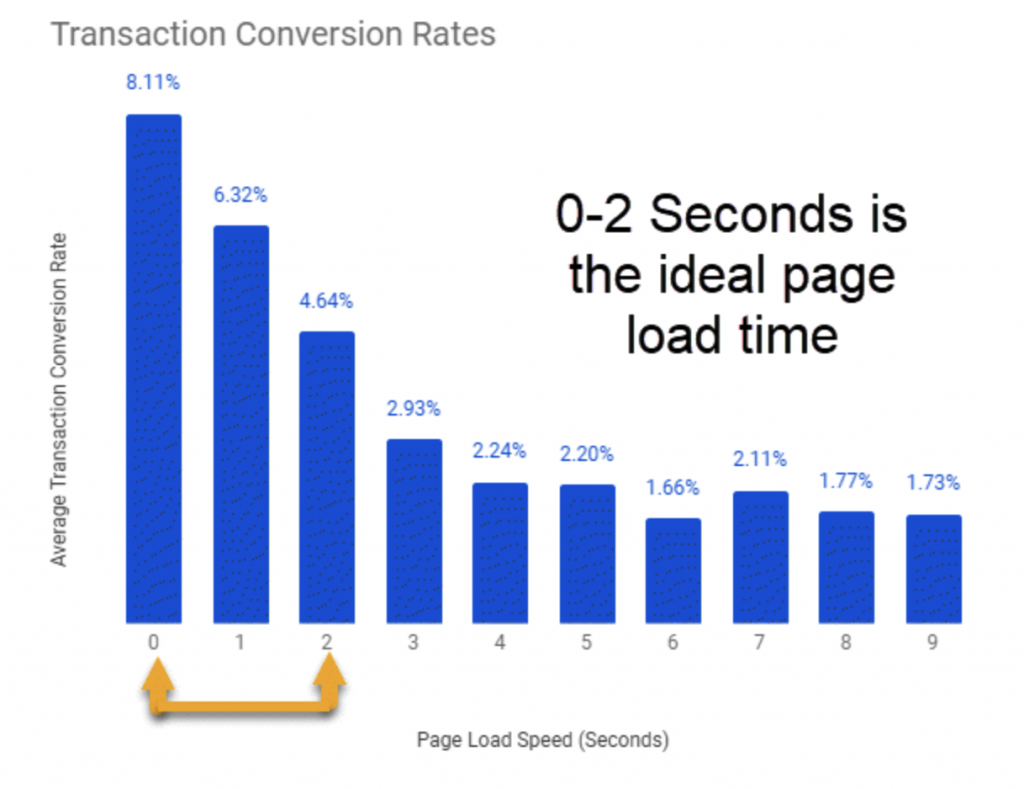
By prioritizing page speed load time, you can enhance user experience, increase engagement, boost conversions, and ultimately achieve your online goals. Remember, in the digital age, every second counts!
9 Essential Tips to Enhance Page Load Speed
- Minimise HTTP requests by reducing the number of elements on a page.
- Enable browser caching to store frequently accessed files locally.
- Optimise images by compressing them without losing quality.
- Use asynchronous loading for CSS and JavaScript files.
- Minify CSS, JavaScript, and HTML to reduce file sizes.
- Utilise a content delivery network (CDN) to distribute content globally.
- Reduce server response time by optimising backend processes.
- Prioritise above-the-fold content to load first for faster perceived speed.
- Implement lazy loading for images and videos below the fold.
Minimise HTTP requests by reducing the number of elements on a page.
To improve page speed load time, it is recommended to minimise HTTP requests by reducing the number of elements on a page. Each element on a webpage, such as images, scripts, and stylesheets, requires a separate HTTP request to load. By simplifying the design and content of a page and combining or eliminating unnecessary elements, you can significantly reduce the number of requests needed to render the page fully. This streamlined approach not only speeds up loading times but also enhances user experience by delivering content more efficiently.
Enable browser caching to store frequently accessed files locally.
Enabling browser caching is a valuable tip to improve page speed load time. By storing frequently accessed files locally on a user’s device, browsers can quickly retrieve these resources without having to fetch them from the server each time a user visits the website. This not only reduces loading times but also enhances the overall browsing experience for visitors. Implementing browser caching is a smart strategy to boost website performance and ensure that users can access content swiftly and efficiently.
Optimise images by compressing them without losing quality.
Optimising images by compressing them without losing quality is a crucial tip for improving page speed load time. By reducing the file size of images through compression techniques, such as using the right file format and adjusting image dimensions, websites can load faster without compromising visual appeal. This not only enhances user experience by ensuring quicker loading times but also contributes to better search engine rankings. Prioritising image optimisation is a simple yet effective way to boost website performance and create a seamless browsing experience for visitors.
Use asynchronous loading for CSS and JavaScript files.
To improve page speed load time, a valuable tip is to utilise asynchronous loading for CSS and JavaScript files. By implementing this technique, you can allow these resources to load simultaneously with other page elements, rather than blocking the rendering process. Asynchronous loading helps enhance the overall performance of your website by reducing wait times for users and ensuring a smoother browsing experience. This approach can significantly boost your site’s speed and efficiency, ultimately leading to higher user satisfaction and improved search engine rankings.
Minify CSS, JavaScript, and HTML to reduce file sizes.
Minifying CSS, JavaScript, and HTML is a highly effective tip for improving page speed load time. By removing unnecessary spaces, comments, and characters from these files, you can significantly reduce their sizes, allowing web pages to load faster. Smaller file sizes mean quicker downloads and less data to transfer, resulting in a smoother and more efficient user experience. Implementing minification techniques not only helps improve your website’s performance but also contributes to better search engine rankings and overall user satisfaction.
Utilise a content delivery network (CDN) to distribute content globally.
Utilising a content delivery network (CDN) to distribute content globally is a highly effective tip for improving page speed load time. By leveraging a CDN, you can store copies of your website’s content on servers located in various geographical locations. This means that when a user accesses your site, they are served content from the nearest server, reducing latency and significantly speeding up load times. Implementing a CDN not only enhances user experience by delivering content faster but also helps in boosting your website’s performance and search engine rankings.
Reduce server response time by optimising backend processes.
Reducing server response time by optimising backend processes is a crucial tip to improve page speed load time. When backend processes are streamlined and optimised, servers can quickly respond to user requests, resulting in faster loading times for web pages. By enhancing the efficiency of server operations, you can significantly reduce the time it takes for content to be delivered to users, ultimately leading to a smoother and more responsive browsing experience. Prioritising backend optimisation is key to enhancing overall website performance and ensuring that visitors have a seamless interaction with your online platform.
Prioritise above-the-fold content to load first for faster perceived speed.
When focusing on improving page speed load time, a valuable tip is to prioritise loading above-the-fold content first. Above-the-fold content refers to the portion of a web page that is visible without scrolling. By ensuring that this content loads quickly, users can perceive the website as faster and more responsive, even if other elements are still loading in the background. Prioritising above-the-fold content enhances user experience and encourages visitors to engage with the site while additional resources load, ultimately leading to a more positive browsing experience.
Implement lazy loading for images and videos below the fold.
Implementing lazy loading for images and videos below the fold is a smart strategy to improve page speed load time. By using lazy loading, you can defer the loading of non-essential media elements until they are about to come into view, reducing the initial load time of your web page. This technique helps prioritise the loading of content that users see first, enhancing their experience by providing faster access to crucial information. Additionally, lazy loading can significantly decrease data usage and improve overall performance, making your website more efficient and user-friendly.
Tags: browser caching, code structure, compression techniques, content delivery networks cdns, elements on a page, file format, file sizes, http requests, image dimensions, image optimization, importance, javascript files, load time, minifying css, optimise images, optimization, page speed load time, server performance, speed, techniques, user experience, website